What to Do If SiteGround's SMS Verification Code Never Arrives
Some links on this page are affiliate links. If you buy through them, we may earn a commission at no extra cost to you. It never decides what we recommend —read how we make money.
Some new SiteGround orders go through an extra verification step before the account is set up: a code sent by text message. It’s routine, and it usually takes a minute. When the code doesn’t arrive, though, it can leave you stuck halfway through buying hosting.
Here’s how the process works, what to check, and what happens next if the text never comes. Details are from SiteGround’s order verification documentation, checked in September 2026.
How Order Verification Works
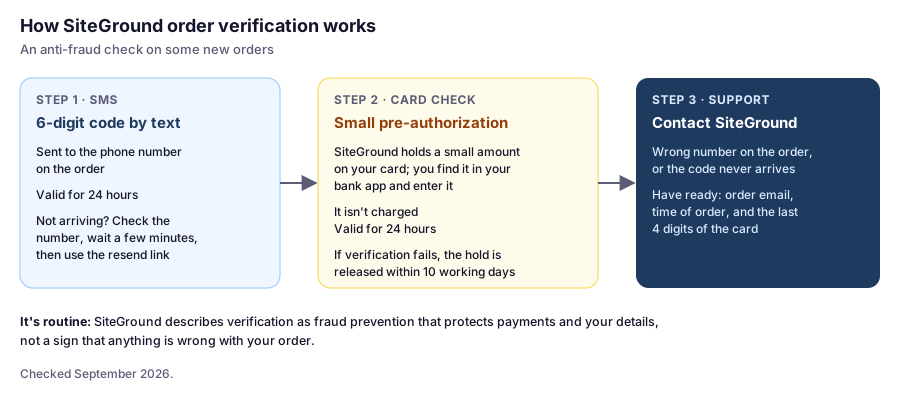
Order verification is part of SiteGround’s fraud prevention: a way to confirm that orders are genuine and payments are safe. Being asked to verify doesn’t mean anything is wrong with your order.
If the Code Doesn’t Arrive
Work through these in order:
- Check the phone number on the order. A mistyped number is the usual cause. Look for a missing digit or the wrong country code.
- Wait a few more minutes. Text messages, especially across countries, can be delayed.
- Use the resend link below the code field on the verification page.
- Check your phone’s filters. Some phones and carriers hide messages from unknown or short-code senders in a spam or “unknown senders” folder.
The code is valid for 24 hours, so there’s no need to rush through the steps.
If SMS Verification Doesn’t Work: The Card Check
When phone verification isn’t enough, SiteGround can verify the order through your card instead:
- SiteGround pre-authorizes a small amount on the card you used.
- You find that amount in your banking app or statement, usually listed as a pending transaction.
- You enter the exact amount to confirm you’re the cardholder.
The amount isn’t charged; it only confirms the card is yours. The amount is valid for 24 hours, and if verification fails, the hold is released within 10 working days, depending on your bank.
When to Contact Support
Contact SiteGround’s support if:
- The phone number on the order is wrong and you can’t change it
- The code still hasn’t arrived after resending and waiting
- The card check doesn’t work for you
It helps to have ready the email address you ordered with, roughly when you placed the order, and the last four digits of the card. Don’t send your full card number or security code to anyone.
A Note on Payment Methods
SiteGround’s order pages take cards; PayPal isn’t listed there. If you’d prefer PayPal, it can be used by arrangement. Our PayPal guide explains how.
Don’t Confuse It With Two-Step Login
Order verification is a one-off check on a new order. Two-step verification is different: an optional extra layer on your SiteGround login that asks for a code each time you sign in. If you lose access to the phone you use for two-step login, email [email protected] explaining the situation.
FAQ
Why does SiteGround ask me to verify my order by SMS?
SiteGround uses order verification as a fraud-prevention measure to confirm orders are legitimate and payments are safe. It doesn't mean anything is wrong with your order.
What should I do if SiteGround's SMS code doesn't arrive?
Check the phone number on the order, wait a few minutes, then use the resend link below the code field. If it still doesn't arrive, contact SiteGround support.
How long is SiteGround's verification code valid?
The SMS verification code is valid for 24 hours.
Will SiteGround charge my card for verification?
No. For the card check, SiteGround pre-authorizes a small amount that you confirm, but it isn't charged. If verification fails, the hold is released within 10 working days, depending on your bank.
Can I pay SiteGround with PayPal instead?
PayPal isn't shown on SiteGround's order pages, but it can be used by arrangement. See our PayPal guide for how it works.
Once You’re Through
Verification is a one-time step for the order. After that, it’s the normal path: your hosting is set up, then install WordPress and check what to do in your first hour.