What Is WordPress? A Beginner's Guide to the World's Favorite CMS
Some links on this page are affiliate links. If you buy through them, we may earn a commission at no extra cost to you. It never decides what we recommend —read how we make money.
If you’ve researched how to build a website, you’ve met WordPress many times over. According to W3Techs, it runs about 40% of all websites and close to 60% of sites whose content management system is known (September 2026). That popularity is useful in itself: more themes, more plugins, more tutorials, and more developers who know it.
This guide explains what WordPress is, how it works, what it costs to run, and when it’s not the right choice.
So, What Is WordPress?
WordPress is free, open-source content management system (CMS) software. It lets you create and edit pages, posts, and media from a web dashboard, without writing code. Under the hood, it’s written in PHP and stores your content in a MySQL or MariaDB database.
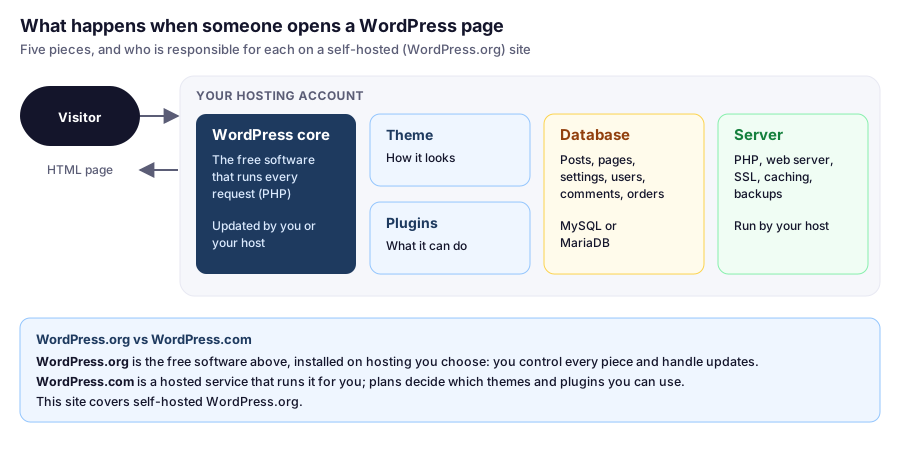
Each time someone opens a page, WordPress reads the content from the database, runs it through your theme and plugins, and sends back a finished HTML page. Good hosts cache that result, so most visitors get a ready-made copy without WordPress doing the work again. That’s why hosting quality matters so much for speed.
WordPress.org vs WordPress.com
The names confuse almost everyone:
- WordPress.org is where you download the free software to install on hosting you choose. You control every part of the site: themes, plugins, code, and data. This is what people usually mean by “WordPress,” and what this site covers.
- WordPress.com is a commercial hosting service that runs WordPress for you. It’s simpler to start, but its plans decide which themes and plugins you can use.
Why So Many Sites Use It
Plugins for almost everything. Contact forms, online stores (WooCommerce), SEO tools, memberships, bookings. The official directory holds tens of thousands of free plugins, and many more are sold commercially.
Themes change the look without code. A theme controls design and layout. Lightweight themes like GeneratePress are fast and flexible; page builders add drag-and-drop design. Our overview of themes and page builders explains how they fit together.
Writing is simple. The block editor works like a document editor: headings, paragraphs, images, and buttons are blocks you add and arrange.
You own it. Your content lives in your own database on your own hosting. You can back it up, move it to another host, or export it whenever you like.
It scales. The same software runs small blogs and very large sites. What changes is the hosting behind it.
What It Costs to Run
The software is free. Running a site costs money in a few places:
| Cost | Typical range |
|---|---|
| Domain | About $20–$23 a year for a .com after any free first year, at the registrars we’ve checked |
| Hosting | From a few dollars a month on an intro deal; check the renewal price |
| Theme and plugins | Free options cover most needs; premium ones are usually yearly subscriptions |
| Your time | Updates, backups, and content |
Our guide to how much a website really costs builds real budgets for year one and the years after.
The Trade-Offs
- You’re responsible for updates. WordPress core, themes, and plugins all need updating. Many hosts, including SiteGround, can do core and plugin updates automatically.
- Plugin quality varies. A poorly built plugin can slow a site or open a security hole. Fewer, well-maintained plugins beat many.
- Security is shared. Your host protects the server; you look after passwords, users, and plugins. Our security guide covers what that means in practice.
- Speed depends on choices. A heavy theme, lots of plugins, or weak hosting make WordPress feel slow. A lean setup on good hosting doesn’t.
When WordPress Isn’t the Best Fit
- A one-page site you’ll never update might be simpler on a basic site builder.
- A large online store that only sells products may be easier on a dedicated ecommerce platform, though WooCommerce handles many stores well.
- Custom web applications, like a booking system with complex logic, are often better built with an application framework.
For blogs, business sites, portfolios, content sites, and small to medium stores, WordPress remains a safe long-term choice.
FAQ
Is WordPress free?
The WordPress software from WordPress.org is free and open source. You pay for a domain and hosting to run it, and optionally for premium themes, plugins, or help.
What's the difference between WordPress.org and WordPress.com?
WordPress.org provides the free software you install on hosting you choose, giving you full control. WordPress.com is a hosted service that runs WordPress for you, with plans that decide which themes and plugins you can use.
How many websites use WordPress?
According to W3Techs in September 2026, WordPress runs about 40% of all websites and close to 60% of sites whose content management system is known.
Do I need to know how to code to use WordPress?
No. You can build and run a site entirely from the dashboard with themes, the block editor, and plugins. Code only becomes useful for custom features or advanced changes.
Is WordPress good for SEO?
WordPress produces clean, crawlable pages and has well-established SEO plugins for titles, sitemaps, and structured data. Rankings still depend mainly on your content, and a fast, lightweight setup helps.
Is WordPress Right for You?
If you want full ownership of your site, room to grow, and the freedom to add features as you need them, WordPress is a sound choice. Next, check what you need before you install it, then choose a host from our WordPress hosting comparison.