Best WordPress Hosting (2026): Picks for Every Situation
Some links on this page are affiliate links. If you buy through them, we may earn a commission at no extra cost to you. It never decides what we recommend —read how we make money.
There isn’t one best WordPress host. There’s the best host for your site, your budget, and how much server work you’re willing to do yourself. A host that’s perfect for a developer spinning up test servers is the wrong call for someone launching their first blog, and the cheapest plan on the page is often not the cheapest by year three.
This guide sorts eight hosts by the situation they fit. It shows what each entry plan costs over four years, how the main hosts handle the jobs you’ll actually do (backups, staging, caching), and what to check on each one before you pay.
Our Top Picks at a Glance
| Your situation | Our pick | Starts at | Renews at |
|---|---|---|---|
| First site, want it to just work | SiteGround | $2.99/mo | $17.99/mo |
| Tightest possible budget | Hostinger | $2.99/mo (48-mo term) | $10.99/mo |
| You want cPanel and a long refund window | ChemiCloud | $1.95/mo (36-mo term) | $11.95/mo |
| Renewable energy matters to you | GreenGeeks | $2.95/mo (12-mo prepay) | $13.95/mo |
| Low price with published traffic estimates | UltaHost | $3.22/mo (24-mo term) | See note below |
| Your site has outgrown shared hosting | ScalaHosting | $29.95/mo | $54.95/mo |
| You’re a developer who wants a configurable server | Kamatera | $4/mo | Pay-as-you-go |
| Cheapest self-managed VPS | Evoxt | $2.99/mo | Same price |
Entry-level plan prices, checked September 2026. Promotions change often, so always confirm the final price at checkout.
How We Chose
Prices, plan specifications, and policies here were checked in September 2026, and the deeper detail on each host lives in its own review.
The analysis comes from my background as a front-end developer since 2016, including custom WordPress and theme development. What I weighed most:
- Total cost over several years, not the intro price. The renewal price and the prepaid term decide what you really pay.
- Backups and restores. How often, how many copies, and whether you can restore without a support ticket.
- Staging. A safe copy to test updates on is the single most useful tool a host can give a WordPress site.
- Published limits. A host that tells you its CPU, RAM, or process limits lets you plan; one that doesn’t leaves you guessing.
- How much you’ll manage yourself, and whether there’s an upgrade path that doesn’t need a painful migration.
- The refund window, and whether your chosen billing term is actually covered by it.
Which Host Fits? Three Questions
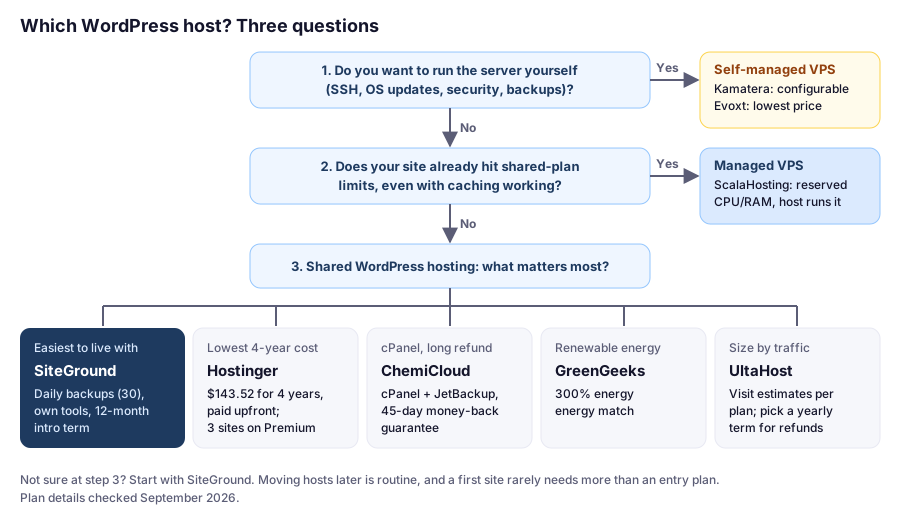
Most people end up at question 3, and that’s the right place for a new site. If you’re unsure whether you’ve outgrown shared hosting, our guide to shared hosting vs. VPS walks through how to check with evidence rather than a hunch.
What the Entry Plans Cost Over Four Years
Intro prices are hard to compare because each host uses a different prepaid term: 12, 24, 36, or 48 months. The fair comparison is what you’ve paid by a fixed point in time. Here’s each shared host’s entry plan at the four-year mark:
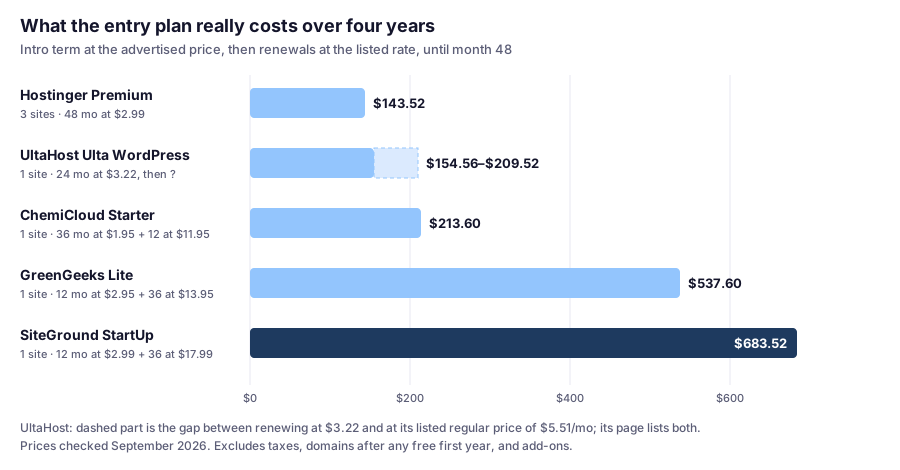
Two things stand out:
- The long-term hosts are cheapest because you pay upfront. Hostinger’s $143.52 and ChemiCloud’s $70.20 first payment cover three or four years. That’s a genuine saving, but it’s also a long commitment made before you know whether you like the host.
- SiteGround costs the most by year four because its intro price only covers 12 months. What you get for the difference is a shorter first commitment, daily backups with 30 copies on every plan, and SiteGround’s own WordPress tooling. Whether that’s worth about $11 a month more than Hostinger is the real decision for most beginners.
For budget plans specifically, our cheap WordPress hosting guide goes deeper into terms and renewals.
Same Jobs, Different Tools
Hosting plans look alike on a sales page. The differences show up in the jobs you’ll do every month. Here’s how the four hosts we’ve reviewed most closely handle them:
| SiteGround | Hostinger | ChemiCloud | ScalaHosting | |
|---|---|---|---|---|
| Control panel | Site Tools (own) | hPanel (own) | cPanel | SPanel (own) |
| Automatic backups | Daily, 30 copies, offsite | Weekly on Premium; daily (kept 7 days) from Unlimited | Daily, 10 / 20 / 30 kept by plan | Daily or more often, offsite; check retention |
| Staging | GrowBig and up | Unlimited and up | Pro and up | Included |
| Page cache header to check | x-proxy-cache |
x-litespeed-cache |
x-litespeed-cache |
Depends on the web server you choose |
| Limits measured as | CPU seconds per hour/day/month | CPU cores, RAM, PHP workers | CloudLinux: CPU, RAM, entry processes | Your server’s cores and RAM |
| Refund | 30 days (shared) | 30 days | 45 days | 30 days full; prorated after, per its ToS |
Checked September 2026. Full detail on each host is in its review: SiteGround, Hostinger, ChemiCloud, ScalaHosting.
Why the cache header row matters: on any of these hosts, you can check in under a minute whether a page came from cache. Open the page logged out, open your browser’s developer tools, reload, and look for that header on the page request. HIT means the server did almost no work. If you never see HIT, fix caching before you conclude the host or plan is too slow.
The Best WordPress Hosts, by Situation
1. SiteGround: Best for Most Beginners
SiteGround is built around WordPress: its own Site Tools dashboard, the Speed Optimizer plugin for caching, daily backups on every plan, and staging from GrowBig up. It’s our default recommendation for beginners.
Best for
- First-time site owners who want a managed, low-maintenance setup
- Small business sites where support and reliability matter more than the lowest price
- Anyone who wants staging and daily backups without add-ons (GrowBig and up)
Not for
- Budgets that can't absorb the renewal price
- Sites that need lots of storage on the entry plan (StartUp includes 10 GB)
Price: StartUp from $2.99/mo prepaid for 12 months, renews at $17.99/moPrices checked: September 2026
| Plan | Intro price | Renews at | Websites | Storage | Staging |
|---|---|---|---|---|---|
| StartUp | $2.99/mo | $17.99/mo | 1 | 10 GB | No |
| GrowBig | $4.99/mo | $29.99/mo | Unlimited | 50 GB | Yes |
| GoGeek | $7.99/mo | $44.99/mo | Unlimited | 100 GB | Yes |
Intro prices are prepaid for 12 months. Prices checked September 2026.
Why I’d pick it for a first site: the things beginners forget to set up, like SSL, backups, and caching, are already there, and the 12-month intro term means you’re not locked in for years while you learn. The dashboard is SiteGround’s own rather than cPanel, with fewer irrelevant options to get lost in.
Check before you buy:
- Budget for the renewal. StartUp goes from $2.99 to $17.99/mo after the first year.
- Resource limits are published as CPU seconds (1,000 per hour on StartUp). Caching keeps most sites well inside that. Our review explains how to read the numbers.
- One site means StartUp; more than one means GrowBig. GrowBig also adds staging.
Pros
- Daily backups on every plan, 30 copies kept offsite
- Staging on GrowBig and GoGeek
- WordPress-focused tools, including a caching plugin
- 12-month intro term, 30-day money-back guarantee on shared plans
Cons
- Renewal prices are several times the intro price
- Entry plan limited to 1 site and 10 GB
- No cPanel, if that's what you're used to
Read the full SiteGround review, or if you’ve decided, our SiteGround buying guide covers checkout step by step. Not convinced? See SiteGround alternatives.
2. Hostinger: Best for the Tightest Budget
Hostinger has the lowest cost of entry among the managed hosts here, and even its renewal prices are lower than SiteGround’s. The catch is the 48-month term behind the headline price, and weekly backups on the entry plan.
Best for
- Getting a site online for the lowest total cost
- Running a few small sites on one plan
- Beginners comfortable committing to a long prepaid term
Not for
- Anyone who doesn't want to prepay for four years to get the advertised price
- Sites that need daily backups on the cheapest plan (Premium includes weekly)
Price: Premium from $2.99/mo on a 48-month term, renews at $10.99/moPrices checked: September 2026
| Plan | Intro price | Renews at | Websites | Backups |
|---|---|---|---|---|
| Premium | $2.99/mo | $10.99/mo | 3 | Weekly |
| Unlimited | $3.99/mo | $16.99/mo | Unlimited | Daily |
| Cloud Startup | $7.99/mo | $25.99/mo | Unlimited | Daily + on demand |
Intro prices shown for a 48-month term. Prices checked September 2026.
Why it’s the budget pick: $143.52 covers four years of Premium, and even the $10.99/mo renewal is lower than SiteGround StartUp’s. Premium also allows three websites instead of one.
Check before you buy:
- Unlimited is the plan I’d actually get. For $1/mo more, it adds daily backups and staging. Hostinger replaced its Business plan with Unlimited in July 2026, so older guides that mention “Business” mean this tier.
- Limits are published per plan: Premium has 1 CPU core, 2 GB RAM, and 40 PHP workers. You can watch usage under Websites → Dashboard → Hosting plan → Resources Usage.
- The PHP version applies to every site on the plan, so check plugin compatibility across all your sites before changing it.
Pros
- Lowest four-year cost of the managed hosts here
- Lower renewal prices than SiteGround
- Premium allows 3 websites
- Published CPU, RAM, and PHP worker limits
Cons
- Best price requires a 48-month term
- Only weekly backups on the entry plan
- Domain and email become paid after year one
Read the full Hostinger review, or see SiteGround vs Hostinger for a head-to-head.
3. ChemiCloud: Best for cPanel Users
ChemiCloud pairs cPanel with daily backups on every plan, free migrations, and the longest money-back guarantee on this list at 45 days.
Best for
- People who already know cPanel and want to keep using it
- Buyers who want a longer refund window (45 days)
- Anyone moving an existing site who wants free migration
Not for
- Anyone who wants multiple sites on the cheapest plan (Starter is 1 website)
- Anyone who doesn't want a 36-month term
Price: WordPress Starter from $1.95/mo, renews at $11.95/moPrices checked: September 2026
| Plan | Intro price | Renews at | Websites | Entry processes | Daily backups kept |
|---|---|---|---|---|---|
| WordPress Starter | $1.95/mo | $11.95/mo | 1 | 10 | 10 |
| WordPress Pro | $2.95/mo | $17.95/mo | Unlimited | 15 | 20 |
| WordPress Turbo | $3.95/mo | $21.95/mo | Unlimited | 30 | 30 |
Intro prices require a 36-month term. Prices checked September 2026.
Why it stands out: if you’ve used cPanel before, you already know your way around: Softaculous for installs and staging, JetBackup for restores, and Resource Usage for limits. The 45-day refund window gives you two extra weeks over most competitors.
Check before you buy:
- Entry processes are the limit that matters. They cap how many uncached requests run at once. Starter’s 10 is fine for a cached blog; a store should look at Pro or Turbo.
- Staging’s default push replaces the live database. Use the selective option when pushing changes from staging. Our review explains the difference.
- The free domain requires a 36-month plan, and a refund during the guarantee period excludes the domain’s regular registration fee.
Pros
- cPanel with Softaculous and JetBackup
- 45-day money-back guarantee
- Free migrations
- Daily backups on every plan, detailed published limits
Cons
- Intro price requires a 36-month term
- Renewal prices are several times the intro price
- Starter: 1 website, no staging
Read the full ChemiCloud review, or see our guide to WordPress hosting with cPanel.
4. GreenGeeks: Best If Renewable Energy Matters to You
GreenGeeks’ differentiator is its environmental commitment: a “300% Energy Match” on its WordPress plans. The plans themselves are conventional shared hosting with daily backups.
Best for
- Individuals and businesses who want their hosting matched with renewable energy
- Small sites that want daily backups and unmetered traffic
Not for
- Buyers who choose on price alone
- Anyone whose decision rests on a specific control panel (confirm what's included before buying)
Price: Lite from $2.95/mo, renews at $13.95/moPrices checked: September 2026
| Plan | Intro price | Renews at | Websites | Storage |
|---|---|---|---|---|
| Lite | $2.95/mo | $13.95/mo | 1 | 25 GB |
| Pro | $4.95/mo | $18.95/mo | Unlimited | 50 GB |
| Premium | $8.95/mo | $30.95/mo | Unlimited | 100 GB |
Intro prices are prepaid for 12 months. All plans come with unmetered traffic. Prices checked September 2026.
Check before you buy:
- The environmental angle is the reason to choose it. On price, Lite’s four-year cost ($537.60) sits between the budget hosts and SiteGround. If energy matching isn’t a priority, compare on the other factors.
- “Unmetered traffic” isn’t unlimited resources. Like every shared host, the plans still have CPU and memory limits, so ask how they’re set if you expect heavy traffic.
- Refund policy: 30-day money-back guarantee. GreenGeeks mentions a free first-year domain; check the conditions at checkout.
Pros
- Advertised 300% renewable energy match
- Unmetered traffic on all plans
- Daily backups
- 12-month intro term, 30-day money-back guarantee
Cons
- Renewals roughly 3–5× the intro price
- Entry plan limited to 1 website
- Few advantages over rivals beyond the green commitment
5. UltaHost: A Budget Option With Published Traffic Estimates
UltaHost publishes an estimated monthly visit count for each plan, which makes it easier to pick a tier that matches your expected traffic. Its headline prices come with a refund catch worth understanding first.
Best for
- Budget buyers who want to know roughly how much traffic a plan handles
- People who may later move to a WordPress VPS plan with the same provider
Not for
- Anyone who wants the lowest advertised price and a refund window
- Sites that need several email accounts or databases on the entry plan
Price: Ulta WordPress from $3.22/mo on a 24-month term (listed regular price $5.51/mo)Prices checked: September 2026
| Plan | Intro price | Listed regular price | Websites | Est. monthly visits |
|---|---|---|---|---|
| Ulta WordPress | $3.22/mo | $5.51/mo | 1 | ~10,000 |
| WordPress Starter | $5.18/mo | $8.68/mo | 100 | ~25,000 |
| Business WordPress | $7.48/mo | $12.43/mo | 100 | ~100,000 |
| VPS WordPress | $25.72/mo | $45.47/mo | 300 | ~300,000 |
Intro prices billed for 24 months. Visit estimates come from UltaHost’s plan pages. Prices checked September 2026.
Check before you buy:
- Your billing term decides your refund rights. UltaHost’s refund policy covers monthly and annual WordPress plans for 30 days, but not 24- or 36-month plans, which are the ones behind the headline prices. Pick a yearly term if you want a way out.
- Visit estimates assume caching. Cached anonymous visits are cheap for the server; logged-in users and checkouts aren’t. Treat the numbers as a rough guide.
- Confirm the renewal price. UltaHost’s plan pages show two different numbers — the intro rate renewing “for 2 years” and a higher regular price — which is why the chart above shows a range.
Pros
- Published visit estimates per plan
- Generous site limits from the second tier up
- VPS WordPress tier for growth
- 30-day refunds on monthly and annual plans
Cons
- 24-month (and longer) plans aren't refundable
- Entry plan: 1 email account, 2 databases
- Renewal terms need a careful read
Read the full UltaHost review.
6. ScalaHosting: Best When You’ve Outgrown Shared Hosting
ScalaHosting’s managed cloud gives you reserved CPU and RAM while ScalaHosting runs the server. You manage sites through its own SPanel control panel, which is included, so there’s no cPanel license on top.
Best for
- Busy sites and stores that have outgrown shared hosting
- Agencies or freelancers hosting several client sites
- Anyone who wants VPS resources without managing the server
Not for
- A brand-new site with little traffic, which will be overpaying
- Beginners on a tight budget
Price: Managed cloud Build #1 from $29.95/mo, renews at $54.95/moPrices checked: September 2026
| Plan | Intro price | Renews at | CPU | RAM | Storage |
|---|---|---|---|---|---|
| Build #1 | $29.95/mo | $54.95/mo | 2 cores | 4 GB | 50 GB NVMe |
| Build #2 | $44.95/mo | $96.95/mo | 4 cores | 8 GB | 100 GB NVMe |
| Build #3 | $69.95/mo | $170.95/mo | 8 cores | 16 GB | 150 GB NVMe |
| Build #4 | $94.95/mo | $244.95/mo | 12 cores | 24 GB | 200 GB NVMe |
Prices checked September 2026.
Check before you buy:
- Confirm you have a resource problem first. Build #1 renews at $54.95/mo, about three times Hostinger Unlimited or ChemiCloud Pro at renewal. Our shared hosting vs. VPS guide shows how to tell.
- Choosing a web server is server-wide. SPanel lets you switch between Apache, Nginx with Apache, OpenLiteSpeed, and LiteSpeed Enterprise (paid), but the change affects every site and can take the server offline for a few minutes.
- Check backup retention. Backups are offsite and configurable, but the managed cloud page doesn’t state the default retention and sells longer retention as an add-on.
Pros
- Reserved VPS resources without server admin work
- SPanel included, no cPanel license needed
- Free website migration
- Add CPU and RAM without moving servers
Cons
- Big jump in price from shared hosting
- Renewal prices nearly double or more
- SPanel instead of cPanel
Read the full ScalaHosting review.
7. Kamatera: Best for Developers Who Want a Configurable Server
Kamatera sells cloud servers you configure yourself, billed monthly or by usage, with a 30-day free trial. It’s a developer’s tool, not a beginner’s WordPress host.
Best for
- Developers comfortable setting up and securing a Linux server
- Projects that need servers in specific US or European cities
- Short-lived test or staging servers billed by usage
Not for
- Beginners who want a WordPress dashboard out of the box
- Anyone who doesn't want to maintain a server
Price: Cloud servers from $4/mo (1 vCPU, 1 GB RAM, 20 GB NVMe)Prices checked: September 2026
What you get: servers start at $4/mo for 1 vCPU, 1 GB RAM, 20 GB NVMe storage, and 5 TB of traffic. Hourly servers are billed by the minute. Kamatera has 9 US data center locations, including New York, Chicago, Dallas, and Los Angeles, plus European locations such as London, Amsterdam, Frankfurt, Stockholm, Madrid, and Milan. The 30-day free trial covers up to $100 of services on one server.
Check before you buy:
- By default, you manage the server. Managed services are an optional add-on covering the operating system and system configuration. Without it, the web server, PHP, SSL, backups, and security updates are your job.
- Size for WordPress, not the minimum. 1 GB of RAM is tight for a web server, PHP, and a database together. Use the trial to measure real memory use before choosing a size.
Pros
- Highly configurable servers
- Hourly billing and no long-term contracts
- 30-day free trial (up to $100 on one server)
- Many US and European locations
Cons
- Server setup and security are on you unless you add managed services
- No beginner-friendly WordPress dashboard by default
- Easy to over- or under-size a server if you're new to this
Comparing VPS options in more depth? See our best VPS hosting for WordPress guide.
8. Evoxt: Cheapest Self-Managed VPS
Evoxt sells low-cost virtual machines aimed at developers, with US and European locations. Its pricing page doesn’t mention a managed option, so plan on setting up and maintaining the server yourself.
Best for
- Developers who want the lowest-cost VPS for small projects
- Test servers and side projects
Not for
- Beginners
- Anyone who wants hands-off WordPress management
Price: VM-0.5 from $2.99/mo (1 vCore, 512 MB RAM, 5 GB storage)Prices checked: September 2026
| Plan | Price | vCore | RAM | Storage | Bandwidth |
|---|---|---|---|---|---|
| VM-0.5 | $2.99/mo | 1 | 512 MB | 5 GB | 500 GB |
| VM-0.75 | $4.99/mo | 1 | 1 GB | 10 GB | 750 GB |
| VM-1 | $5.99/mo | 1 | 2 GB | 20 GB | 1,000 GB |
Prices checked September 2026.
Check before you buy:
- Start at VM-1 for WordPress. 512 MB of RAM is too tight for a web server, PHP, and a database; 2 GB is a practical starting point.
- Backups: weekly automatic offsite backups. For a site that changes often, add your own daily backup.
- The refund policy isn’t on the pricing page, so check it before paying.
Pros
- Very low monthly prices
- US and European locations
- Weekly automatic offsite backups advertised
Cons
- You manage the server yourself
- Smallest plans are too small for most WordPress sites
- Refund policy isn't shown on the pricing page
A Special Case: Windows Hosting
WordPress runs on Linux servers, which is what every host above provides. If your project needs Windows Server instead, for example an ASP.NET application, that’s a different kind of hosting. AccuWebHosting specializes in Windows hosting and Windows VPS plans. That’s outside what this guide covers, so compare its current plans directly.
Four Common Situations, With the Math
These use prices verified in September 2026 and four-year totals, since that’s how long many people keep their first host. The situations are illustrative examples.
A First Blog, One Site
| Host and plan | 4-year total | What you get for it |
|---|---|---|
| Hostinger Premium | $143.52 upfront | 3 sites, weekly backups, 48-month commitment |
| ChemiCloud Starter | $213.60 | cPanel, 10 daily backups, 36-month commitment |
| SiteGround StartUp | $683.52 | 30 daily backups, own tools, 12-month commitment |
My pick: SiteGround if you want the least to think about and the option to leave after a year; Hostinger if the budget is fixed and you’re confident about four years. Both are sensible. The $540 gap over four years is the price of a shorter commitment and more backup copies.
A Small Business Running Three Sites
A main site, a booking or landing site, and a blog. Three sites rule out single-site plans:
- Hostinger Premium: $143.52 for four years, but weekly backups. Unlimited adds daily backups and staging for $191.52.
- ChemiCloud WordPress Pro: 36 months at $2.95 plus 12 at $17.95 = $321.60, with cPanel and staging.
- SiteGround GrowBig: 12 months at $4.99 plus 36 at $29.99 = $1,139.52, with staging and 30 daily backups.
My pick: Hostinger Unlimited for the lowest cost with daily backups; SiteGround GrowBig if you’d rather pay more for a one-year commitment and SiteGround’s tooling. Remember that all three sites share one account’s limits on any of these plans.
An Online Store That Plans to Grow
Start: a shared plan with room for uncached traffic, since carts and checkouts can’t be page-cached. ChemiCloud Turbo (30 entry processes, Redis object caching) costs $405.60 over four years; SiteGround GrowBig adds staging to test updates before a sale.
Move up when: your host’s usage graphs hit the plan’s limits during normal trading, not just a one-off sale, even with caching working. That’s the point for a managed VPS like ScalaHosting Build #1 ($54.95/mo at renewal).
A Developer’s Side Project
Pick: a self-managed server. Evoxt’s VM-1 with 2 GB RAM costs $287.52 over four years at $5.99/mo. Kamatera’s 30-day trial lets you test a configuration first. Budget time for security updates and backups. That’s the real cost. See managed vs. shared hosting for exactly what you take on.
Before You Pay: A Five-Minute Checklist
Whichever host you choose, check these at checkout. They’re the details sales pages put in smaller print:
- The renewal price for the plan and term you’ve selected, not just the intro price.
- Whether your term is refundable. Most hosts cover every term; UltaHost doesn’t cover its 24- and 36-month WordPress plans.
- Backup frequency on your specific plan. Daily on some entry plans, weekly on others.
- Staging on your plan. It’s missing from several entry tiers.
- Data center location. Pick one close to your visitors; most hosts ask at checkout.
Then, in your first week, confirm caching works with the header check above and take a manual backup before installing anything. Our checklist of what you need before installing WordPress covers the rest.
Moving Hosts Later Isn’t the End of the World
Choosing the “wrong” host isn’t permanent. WordPress sites can be migrated, and several providers here, including ChemiCloud and ScalaHosting, advertise free migration. Our guide to migrating a WordPress site to SiteGround walks through the process, and the same principles apply to any host.
Whichever host you pick, pairing it with a lightweight theme goes a long way for speed. Our GeneratePress setup tutorial shows how.
FAQ
What is the best WordPress hosting for beginners?
For most beginners, SiteGround is the easiest place to start. It includes daily backups on every plan, WordPress-focused tools, a 12-month intro term, and a 30-day money-back guarantee on shared hosting. If your budget is very tight, Hostinger costs less over four years, but its lowest price requires a 48-month term.
Which WordPress host is cheapest over the long run?
Among the entry plans we compared, Hostinger Premium costs the least over four years: $143.52 paid upfront for 48 months (checked September 2026). ChemiCloud Starter comes to $213.60 over the same period, and SiteGround StartUp to $683.52, because its intro price covers only 12 months.
Why is the renewal price so much higher than the first payment?
Most hosts discount the first term to win new customers, then charge the regular rate when you renew. For example, SiteGround's StartUp plan is $2.99/mo prepaid for the first 12 months and renews at $17.99/mo. Compare hosts on multi-year totals to see the real cost.
Do I need managed WordPress hosting?
If you don't want to handle server setup, security patches, and software updates yourself, yes. Managed hosting lets you focus on WordPress. Self-managed VPS hosting is cheaper per unit of resources, but it's a system administration job.
How can I tell if my host's caching is working?
Open a page logged out, open your browser's developer tools, reload, and check the response headers on the page request. SiteGround uses x-proxy-cache and LiteSpeed hosts like Hostinger and ChemiCloud use x-litespeed-cache. HIT means the page was served from cache.
When should I move from shared hosting to a VPS?
When your host's usage graphs show you hitting the plan's limits during normal traffic, even with caching working, or when you need server-level control. A managed VPS, such as ScalaHosting's managed cloud plans, adds resources without adding server management.
Can I switch WordPress hosts later?
Yes. WordPress sites can be migrated between hosts, and some providers, including ChemiCloud and ScalaHosting, advertise free migrations. Choosing a host isn't a permanent decision.
Are the prices in this guide current?
They were checked in September 2026. Hosting prices and promotions change often, so always confirm the final price at checkout.
The Bottom Line
If you’re launching your first WordPress site, SiteGround is the safe default: managed, WordPress-focused, with daily backups built in and only a one-year first commitment. Just plan for the renewal price. If budget comes first, Hostinger is the cheapest over four years. ChemiCloud suits cPanel users, GreenGeeks is the pick for renewable energy, and UltaHost works if you choose a refundable term. When you genuinely outgrow shared hosting, ScalaHosting adds resources without adding server work. Developers who want full control should look at Kamatera or Evoxt.