Best VPS Hosting for WordPress (2026): Managed & Unmanaged

Some links on this page are affiliate links. If you buy through them, we may earn a commission at no extra cost to you. It never decides what we recommend —read how we make money.
A VPS gives your site its own allocated CPU and RAM instead of sharing a server’s resources with other accounts. That’s the right move when a WordPress site genuinely outgrows shared hosting. It’s also easy to overspend on, or to buy a server you then have to learn to run.
This guide compares the VPS options we cover by the question that matters most: do you want the host to manage the server, or will you? It also shows what “managed” actually covers at each host, what RAM costs once intro prices end, and what to do in your first hour if you run the server yourself. Prices and specs were checked on each provider’s website on September 15–17, 2026.
Quick Picks
| Your situation | Pick | Starts at | Managed? |
|---|---|---|---|
| Busy site or store, no sysadmin skills | ScalaHosting managed cloud | $29.95/mo (2 cores, 4 GB), renews $54.95 | Yes |
| Managed VPS on a tight budget | UltaHost VPS | $5.52/mo (1 core, 1 GB), 24-mo term | Listed as managed |
| Most RAM for the money, self-managed | Hostinger KVM VPS | $6.49/mo (1 vCPU, 4 GB), renews $11.99 | Self-managed |
| Configurable cloud server with a free trial | Kamatera | $4/mo (1 vCPU, 1 GB) | Optional add-on |
| Lowest monthly price | Evoxt | $2.99/mo (512 MB); $5.99/mo for 2 GB | Not mentioned |
| Managed VPS with cPanel included | GreenGeeks VPS | $69.95/mo (4 vCPU, 4 GB) | Yes |
Prices checked September 2026. Promotional prices and terms change; confirm at checkout.
Managed vs. Self-Managed VPS: Decide This First
- Managed VPS: the host handles the server’s operating system, security patches, and core software. You get dedicated resources without becoming a system administrator. It costs more.
- Self-managed (unmanaged) VPS: you get root access to a raw server. You install and secure the web server, PHP, database, SSL, firewall, and backups, then keep them all updated. It’s cheaper per unit of resources, and costs you time.
As a developer, my advice is simple: if you’re asking whether you can manage a VPS yourself, choose managed. An unmanaged server that isn’t patched or backed up is a liability, not a bargain. Our guide to managed vs. shared hosting goes deeper on what “managed” covers.
How Much VPS Does a WordPress Site Need?
- RAM is usually the first limit. A WordPress server runs a web server, PHP, and a database together. 1 GB is tight; 2 GB is a practical minimum for a real site, and 4 GB is comfortable for many small-to-medium sites or a small store.
- Uncached traffic sets the size. Cached pages barely touch PHP or the database. Logged-in users, carts, and checkouts do, so stores and membership sites need more for the same traffic.
- Measure rather than guess. Our guide to shared hosting vs. VPS has a simple RAM formula and a command to measure how much memory your PHP workers actually use.
Start with the smallest plan that fits and scale up when you see real resource pressure.
What “Managed” Actually Covers at Each Host
“Managed VPS” isn’t a standard term. Each host means something slightly different by it, so compare the details rather than the label:
| Host | Management | Panel | Backups included | Worth knowing |
|---|---|---|---|---|
| ScalaHosting managed cloud | Managed | SPanel, free | Daily or more often, offsite | Choose your web server; add CPU and RAM without moving; default retention not stated |
| UltaHost VPS | Listed as managed: installation, configuration, updates, and monitoring | Free Hestia or CyberPanel; paid cPanel, Plesk, and others | Weekly, plus snapshots you can take anytime | Yearly and longer VPS terms aren’t refundable |
| GreenGeeks VPS | Fully managed, 24/7 monitoring | cPanel | — | Free cPanel migrations; renewal not shown |
| Kamatera | Unmanaged by default; managed services are an add-on covering the OS and system configuration | Your choice | — | Hourly billing, 30-day trial |
| Hostinger KVM VPS | Self-managed, full root access | One-click panels (cPanel needs its own license) | Weekly | 180-day cooldown between VPS refunds |
| Evoxt | No managed option mentioned | Your choice | Weekly offsite, advertised | Refund policy not on the pricing page |
Checked September 2026. “—” means the provider doesn’t list this detail.
The question to ask any managed host: if a plugin update breaks the site at night, will they fix WordPress, or only the server under it? Most managed VPS support is about the server. Your WordPress plugins, theme, and content remain your job.
The Best VPS Hosting for WordPress
1. ScalaHosting: Best Managed VPS
ScalaHosting’s managed cloud includes its free SPanel control panel, SShield security, automatic offsite backups, free migrations, and a choice of web servers including LiteSpeed and Nginx, across many US and European data centers.
Best for
- Busy WordPress sites and WooCommerce stores
- Agencies hosting several client sites
- Anyone who wants VPS resources without server administration
Not for
- New or low-traffic sites
- People who specifically want cPanel
Price: Build #1 $29.95/mo (2 cores, 4 GB RAM, 50 GB NVMe), renews at $54.95/moPrices checked: September 2026
| Plan | CPU | RAM | Storage | Intro | Renews |
|---|---|---|---|---|---|
| Build #1 | 2 cores | 4 GB | 50 GB NVMe | $29.95/mo | $54.95/mo |
| Build #2 | 4 cores | 8 GB | 100 GB NVMe | $44.95/mo | $96.95/mo |
| Build #3 | 8 cores | 16 GB | 150 GB NVMe | $69.95/mo | $170.95/mo |
| Build #4 | 12 cores | 24 GB | 200 GB NVMe | $94.95/mo | $244.95/mo |
Why it’s our managed pick: SPanel avoids paying for a cPanel license, which cPanel’s own pricing page lists from $29.99/mo for a single account on monthly billing. ScalaHosting’s Terms of Service also offer a full refund within 30 days and a partial refund for unused time afterward, for new clients.
Watch for: renewals roughly double or more, and extended backup retention is a paid add-on. Full details in our ScalaHosting review.
2. UltaHost: Budget Managed VPS
UltaHost’s VPS plans are managed servers with DDR5 RAM, NVMe storage, free SSL, DDoS protection, automated backups, and free migrations, across 31 data center locations.
Best for
- A low-cost managed VPS
- Choosing from many US and European locations
Not for
- Anyone who wants a refund window on the lowest price (yearly and longer VPS terms aren't refundable)
Price: VPS Basic $5.52/mo (1 core, 1 GB) · VPS Professional $15.87/mo (3 cores, 4 GB), both on 24-month termsPrices checked: September 2026
| Plan | CPU | RAM | Storage | Price (24-mo term) | Regular price |
|---|---|---|---|---|---|
| VPS Basic | 1 core | 1 GB | 30 GB NVMe | $5.52/mo | $9.19/mo |
| VPS Business | 2 cores | 2 GB | 50 GB NVMe | $9.78/mo | $16.10/mo |
| VPS Professional | 3 cores | 4 GB | 75 GB NVMe | $15.87/mo | $26.22/mo |
| VPS Enterprise | 4 cores | 6 GB | 100 GB NVMe | $20.69/mo | $34.49/mo |
Why consider it: it’s the lowest-priced managed VPS we cover. For WordPress, I’d start at VPS Business (2 GB) or Professional (4 GB) rather than Basic.
Watch for: UltaHost doesn’t refund yearly, biennial, or triennial VPS plans, and the prices above are for 24-month terms. See our UltaHost review.
3. Hostinger KVM VPS: Most RAM for the Money (Self-Managed)
Hostinger’s KVM VPS plans pair generous RAM with NVMe storage and free weekly backups. They’re self-managed with full root access, with one-click deployment options for panels including cPanel, CloudPanel, CyberPanel, DirectAdmin, and Plesk.
Best for
- Developers who want lots of RAM for a low price
- Running several apps or sites on one self-managed server
- One-click deployment of a control panel of your choice
Not for
- Anyone who wants the host to manage the server
- Sites needing daily backups by default (weekly included)
Price: KVM 1 $6.49/mo (1 vCPU, 4 GB RAM, 50 GB NVMe), renews at $11.99/moPrices checked: September 2026
| Plan | vCPU | RAM | Storage | Bandwidth | Intro | Renews |
|---|---|---|---|---|---|---|
| KVM 1 | 1 | 4 GB | 50 GB NVMe | 4 TB | $6.49/mo | $11.99/mo |
| KVM 2 | 2 | 8 GB | 100 GB NVMe | 8 TB | $8.99/mo | $14.99/mo |
| KVM 4 | 4 | 16 GB | 200 GB NVMe | 16 TB | $12.99/mo | $28.99/mo |
| KVM 8 | 8 | 32 GB | 400 GB NVMe | 32 TB | $25.99/mo | $49.99/mo |
Renewal prices are quoted “for 2 years.” Confirm the intro term at checkout.
Why consider it: 4 GB of RAM on the entry plan is a lot for the price, even at renewal. For a developer comfortable running a server, that’s excellent value.
Watch for: it’s self-managed, so security, updates, and a WordPress stack are on you. Backups are weekly by default. Commercial panels can add cost; cPanel, for example, requires its own paid license. Hostinger’s refund policy covers KVM VPS within 30 days, but applies a 180-day cooldown before another VPS refund.
4. Kamatera: Best Configurable Cloud Server
Kamatera sells configurable cloud servers billed monthly or by the minute, with no long-term contracts, 9 US data center locations, many in Europe, and a 30-day free trial worth up to $100 on one server.
Best for
- Developers who want to configure CPU, RAM, and storage precisely
- Short-term, test, or staging servers billed by usage
- Trying a VPS risk-free with a free trial
Not for
- Beginners who want a managed WordPress setup out of the box
Price: From $4/mo (1 vCPU, 1 GB RAM, 20 GB NVMe, 5 TB traffic)Prices checked: September 2026
Why consider it: flexibility. Hourly billing and no contracts make it ideal for testing, staging, or scaling up temporarily. The free trial lets you build and benchmark a setup before paying.
Watch for: servers are unmanaged by default; Kamatera’s managed services are an optional add-on covering the OS and system configuration. The $4 entry server’s 1 GB of RAM is tight for WordPress, so size up for a real site.
5. Evoxt: Lowest Monthly Price
Evoxt offers very low-priced VMs with US (Los Angeles, New York) and European (London, Paris, Amsterdam, Frankfurt, Warsaw, Zurich) locations, with weekly automatic offsite backups.
Best for
- Developers who want the cheapest VPS for small projects
- Side projects and test servers
Not for
- Beginners
- Anyone who wants managed hosting
Price: VM-0.5 $2.99/mo (512 MB) · VM-1 $5.99/mo (1 vCore, 2 GB RAM, 20 GB storage)Prices checked: September 2026
| Plan | vCore | RAM | Storage | Bandwidth | Price |
|---|---|---|---|---|---|
| VM-0.5 | 1 | 512 MB | 5 GB | 500 GB | $2.99/mo |
| VM-0.75 | 1 | 1 GB | 10 GB | 750 GB | $4.99/mo |
| VM-1 | 1 | 2 GB | 20 GB | 1,000 GB | $5.99/mo |
Why consider it: the lowest entry price we cover, with monthly pricing and useful US and European locations.
Watch for: Evoxt’s pricing page doesn’t mention a managed option or its refund policy, so plan to run the server yourself and check refund terms before buying. For WordPress, treat VM-1 (2 GB) as the starting point.
6. GreenGeeks VPS: Managed VPS With cPanel
GreenGeeks’ VPS plans list a cPanel control panel, fully managed VPS support with 24/7 monitoring, free cPanel migrations, and a 30-day money-back guarantee.
Best for
- cPanel users who want a fully managed VPS
- Businesses that value GreenGeeks' environmental commitment
Not for
- Budget buyers, since it's the most expensive entry VPS here
Price: 4 GB plan $69.95/mo (4 vCPU, 4 GB RAM, 75 GB SSD)Prices checked: September 2026
| Plan | vCPU | RAM | Storage | Intro price |
|---|---|---|---|---|
| 4 GB | 4 cores | 4 GB | 75 GB SSD | $69.95/mo |
| 8 GB | 6 cores | 8 GB | 150 GB SSD | $129.95/mo |
| 16 GB | 6 cores | 16 GB | 250 GB SSD | $179.95/mo |
Why consider it: if you want cPanel on a managed VPS, it’s included here rather than a separate license to arrange.
Watch for: it costs far more than ScalaHosting’s managed entry plan, and its VPS page doesn’t list renewal prices or term requirements, so confirm them at checkout.
A Note on Windows VPS
Everything above is Linux hosting, which is what WordPress runs on. If you need a Windows VPS, for example for .NET applications, AccuWebHosting specializes in Windows hosting. Compare its current Windows plans directly on its site.
Price per GB of RAM, Before and After Renewal
RAM is often the first limit for WordPress, so price per GB is a useful way to compare. The intro price only tells half the story:
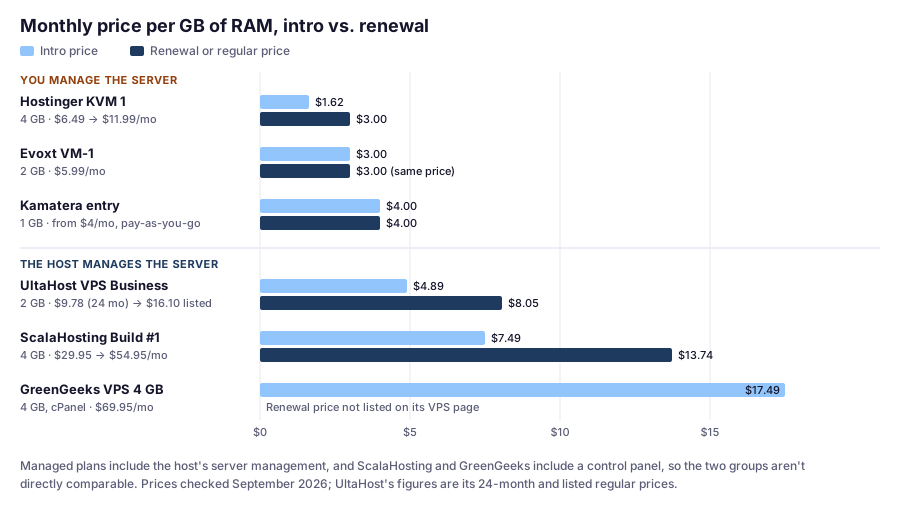
What stands out:
- Hostinger’s advantage shrinks at renewal. $1.62 per GB becomes $3.00, the same as Evoxt, which has no intro discount at all.
- Managed plans cost more per GB because you’re buying labor. ScalaHosting’s $13.74 per GB at renewal includes SPanel, server management, and backups. Compare it with the time you’d spend running a $3-per-GB server yourself.
- GreenGeeks is the outlier, largely because cPanel is included. If cPanel isn’t essential, ScalaHosting’s managed entry plan costs less than half as much at intro.
Calculated from prices checked September 2026.
Refund Rules Differ a Lot for VPS
Check these before choosing a term:
- ScalaHosting: full refund within 30 days, then a partial refund for unused time, for new clients (per its Terms of Service)
- Hostinger: 30-day refunds on KVM VPS, with a 180-day cooldown before another VPS refund
- UltaHost: no refunds on yearly, biennial, or triennial VPS plans
- GreenGeeks: 30-day money-back guarantee listed
- Kamatera: a 30-day free trial worth up to $100 on one server instead
- Evoxt: not shown on its pricing page; check before buying
Which VPS Should You Choose?
- You don’t want to manage a server: ScalaHosting managed cloud, or UltaHost for a lower budget
- You want cPanel on a managed VPS: GreenGeeks, or ScalaHosting if a free alternative panel (SPanel) is acceptable
- You’re a developer who wants the best value: Hostinger KVM VPS
- You want flexible, usage-based billing or a free trial: Kamatera
- You want the absolute lowest price: Evoxt
Still deciding between VPS and shared hosting? Read shared hosting vs. VPS. For shared WordPress hosting picks, see our WordPress hosting comparison.
Four Situations, With the Math
Prices verified September 2026. The situations are illustrative examples.
A Store Leaving Shared Hosting, No Sysadmin Skills
Options: ScalaHosting Build #1 (2 cores, 4 GB) at $29.95/mo, renewing at $54.95/mo; or UltaHost VPS Professional (3 cores, 4 GB) at $15.87/mo on a 24-month term, which is $380.88 paid upfront and not refundable.
How to decide: UltaHost costs less, but you’re committing $380.88 you can’t get back, with weekly backups. ScalaHosting costs more, offers a 30-day full refund for new clients, and lets you add resources without moving servers. For a store’s first VPS, I’d pay for the refund window and the easy scaling.
A Developer Running Five Personal Sites
Pick: Hostinger KVM 2 (2 vCPU, 8 GB RAM) at $8.99/mo, renewing at $14.99/mo. That’s plenty of room for five small sites with page caching.
The real cost: the first-hour setup below, plus regular time for updates and checking backups. If you’d rather not, ScalaHosting Build #1 at $54.95/mo at renewal costs about $40/mo more to hand that work off.
An Agency That Wants cPanel on a Managed VPS
Options: GreenGeeks’ 4 GB VPS at $69.95/mo with cPanel included, or ScalaHosting Build #1 at $29.95/mo with SPanel.
The math: at intro prices, that’s $40/mo, or $480 a year, for keeping cPanel. Worth it if your team, scripts, or client handovers depend on cPanel; otherwise, try SPanel first. Our guide to WordPress hosting with cPanel explains why cPanel costs so much on a VPS.
Testing a New Server Setup for a Weekend
Pick: Kamatera’s free trial (up to $100 on one server) or its hourly billing. Build the stack, run your tests, and delete the server.
Your First Hour on a Self-Managed VPS
If you choose an unmanaged server, do these before installing WordPress. The commands are for Ubuntu, a common choice; other distributions differ.
-
Update everything:
sudo apt update && sudo apt upgrade -y -
Create a non-root user with sudo (replace
deploywith your own name), then copy your SSH key to it from your own computer:adduser deploy usermod -aG sudo deploy # then, on your own computer: ssh-copy-id deploy@your-server-ip -
Turn off password and root logins over SSH. In
/etc/ssh/sshd_config, setPasswordAuthentication noandPermitRootLogin no, then runsudo systemctl restart ssh. Test a new login in a second terminal before closing the first. -
Enable a firewall that allows only SSH and web traffic:
sudo ufw allow OpenSSH sudo ufw allow 80,443/tcp sudo ufw enable -
Turn on automatic security updates:
sudo apt install unattended-upgrades sudo dpkg-reconfigure --priority=low unattended-upgrades -
Install the web stack, or a control panel that sets it up for you, then add SSL with Let’s Encrypt. Certbot’s packages renew certificates automatically; confirm with
sudo certbot renew --dry-run. -
Set up offsite backups and test a restore. Back up the database and
wp-contentto storage outside the server. A backup you’ve never restored is a guess. -
Add uptime monitoring, so you hear about downtime before your visitors do.
If that list feels like a lot, it’s a sign a managed VPS is the better fit. Our SSH basics guide is a good place to gauge your comfort level, and managed vs. shared hosting lists everything you take on.
FAQ
What is the best VPS hosting for WordPress?
For most people who need a VPS, a managed option like ScalaHosting's managed cloud is the best fit, because the host runs the server. Developers who can manage their own server get more resources for the money with Hostinger's KVM VPS, or flexibility and a free trial with Kamatera.
What is the cheapest VPS hosting?
Of the providers we cover, Evoxt's VM-0.5 is the lowest at $2.99/mo, and its 2 GB VM-1 plan is $5.99/mo. For a managed VPS, UltaHost's VPS Basic is $5.52/mo on a 24-month term (all checked September 2026).
Should I choose managed or unmanaged VPS?
Choose managed unless you're comfortable securing, updating, and backing up a Linux server yourself. Unmanaged VPS costs less per resource but requires ongoing sysadmin work.
How much RAM do I need for a WordPress VPS?
It depends on traffic and caching, but 1 GB is tight for a web server, PHP, and a database together. 2 GB is a practical minimum, and 4 GB is comfortable for many small-to-medium WordPress sites. Measure your PHP workers' real memory use before sizing up.
What does managed VPS hosting include?
It varies by host. ScalaHosting includes its SPanel control panel, offsite backups, and server management; UltaHost's team handles installation, configuration, updates, and monitoring; Kamatera sells management as an add-on. In most cases the host manages the server, while your WordPress plugins, theme, and content stay your job.
Can I get a refund on VPS hosting?
It depends on the host and term. ScalaHosting offers a full refund within 30 days and prorated refunds afterward for new clients; Hostinger offers 30-day refunds on KVM VPS with a 180-day cooldown; UltaHost doesn't refund yearly or longer VPS plans; and Kamatera offers a free trial instead (checked September 2026).
Which VPS includes cPanel?
GreenGeeks' VPS plans list a cPanel control panel. Hostinger's KVM VPS offers one-click cPanel deployment, but cPanel requires its own license. ScalaHosting includes its free SPanel instead.
Is a VPS faster than shared hosting?
Not automatically. A VPS gives you allocated resources, but it has to be configured and cached well. A well-tuned shared plan can outperform a poorly configured VPS.
The Bottom Line
For most WordPress sites that need a VPS, ScalaHosting’s managed cloud is the practical choice: dedicated resources without the sysadmin work. On a tighter budget, UltaHost offers low-cost managed VPS plans, as long as you understand its refund rules. If you’re a developer, Hostinger’s KVM VPS gives you the most RAM for the money, Kamatera gives you flexibility and a free trial, and Evoxt gives you the lowest price. And if cPanel on a managed VPS matters most, look at GreenGeeks.