WordPress Hosting With cPanel (2026): Best Options Compared
Some links on this page are affiliate links. If you buy through them, we may earn a commission at no extra cost to you. It never decides what we recommend —read how we make money.
If you’ve managed a website before, there’s a good chance you learned on cPanel. It’s familiar, it’s everywhere, and finding it on a new host feels like coming home. But many popular WordPress hosts have moved to their own dashboards, so “does it have cPanel?” is a fair question before you buy.
This guide shows which hosts we cover include cPanel, explains why cPanel is easy to include on shared hosting but expensive on a VPS, maps common WordPress tasks between cPanel and a custom panel, and helps you decide whether you actually need it.
Quick Answer: Which Hosts Use cPanel?
| Host | Control panel | Notes |
|---|---|---|
| ChemiCloud | cPanel | With Softaculous, JetBackup, and phpMyAdmin |
| GreenGeeks | cPanel, plus a GreenGeeks dashboard | Open cPanel and Softaculous from the GreenGeeks dashboard |
| UltaHost | cPanel (shared hosting) | Its knowledge base covers cPanel login for shared hosting, with separate instructions for WordPress hosting |
| ScalaHosting | SPanel (its own panel) | Included free; ScalaHosting positions it as an alternative to cPanel |
| SiteGround | Site Tools (its own panel) | No cPanel |
| Hostinger | hPanel (its own panel) | No cPanel |
Checked September 2026.
Our pick for WordPress hosting with cPanel: ChemiCloud. It combines cPanel with daily backups on every plan, one-click staging from its WordPress Pro plan, published resource limits, and a 45-day money-back guarantee.
What Is cPanel?
cPanel is a hosting control panel: the dashboard where you manage the server side of your website. With it you can install WordPress through an installer like Softaculous, manage files and databases, create email accounts, handle domains and DNS, set up SSL, and see resource usage and logs.
It isn’t WordPress. WordPress has its own dashboard for content, themes, and plugins. cPanel sits a level below, managing the hosting account WordPress runs on.
One detail that matters for freelancers: a shared hosting plan is one cPanel account with one login. You can run several sites in it, but they share that login and that account’s limits. If each client needs their own cPanel login, you need separate accounts.
Why cPanel Is Cheap on Shared Hosting and Expensive on a VPS
cPanel is licensed software, priced by how many hosting accounts a server runs. cPanel’s own pricing page lists these tiers on monthly billing (checked September 2026):
| cPanel license | Accounts | Monthly price | Per account, if full |
|---|---|---|---|
| Solo | 1 | $29.99/mo | $29.99 |
| Admin | Up to 5 | $35.99/mo | $7.20 |
| Pro | Up to 30 | $53.99/mo | $1.80 |
| Premier | Up to 100 (additional accounts $0.49 each) | $69.99/mo | $0.70 |
Annual billing is listed at a lower monthly rate.
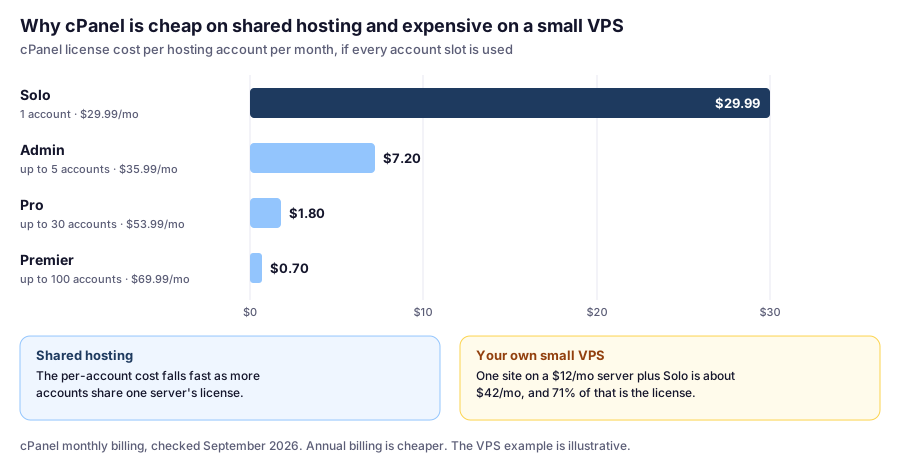
The per-account cost falls quickly as more accounts share a license, and a shared server holds many accounts. On your own VPS, the opposite happens: the whole license lands on you. An unmanaged VPS at around $12/mo plus a Solo license comes to about $42/mo, and most of that is the panel.
That’s the main reason some hosts built their own panels:
- ScalaHosting built SPanel as an alternative to rising cPanel prices, and includes it free with its managed cloud.
- SiteGround uses Site Tools, and Hostinger uses hPanel.
Do You Actually Need cPanel for WordPress?
Probably not, if you’re building a single WordPress site. Most day-to-day work happens inside WordPress itself, and custom panels cover the hosting tasks you’ll need.
cPanel is worth prioritizing if you:
- Already know it well and don’t want to relearn hosting tasks
- Manage several sites or clients and want the same tools everywhere
- Follow tutorials or documentation written for cPanel
- Might move hosts again, since cPanel skills transfer between the many hosts that use it
A custom panel may suit you better if you:
- Are new to hosting and want a simpler, WordPress-focused interface
- Value features the host builds into its own dashboard, such as SiteGround’s staging and backup tools
- Are on a VPS and want to avoid license costs
As a developer, I’d put the control panel below backups, renewal price, and staging in importance. A familiar panel is nice. A daily backup you can restore is essential.
Same Tasks, Different Panels
If you learned on cPanel and you’re considering a host with its own dashboard, the jobs are the same; only the menu changes. Here’s where the tasks you’ll do most often live on ChemiCloud’s cPanel and SiteGround’s Site Tools:
| Task | cPanel (ChemiCloud) | Site Tools (SiteGround) |
|---|---|---|
| Restore a backup | Files › JetBackup 5 | Security › Backups |
| Change PHP version | Software › Select PHP Version | Devs › PHP Manager |
| Create a staging copy | Software › Softaculous (Pro and up) | WordPress › Staging (GrowBig and up) |
| Page caching | LiteSpeed Cache plugin in WordPress | Speed › Caching, with the Speed Optimizer plugin |
| Edit DNS | Domains › Zone Editor | Domain › DNS Zone Editor |
| Browse files | Files › File Manager | Site › File Manager |
| Check resource usage | Metrics › Resource Usage | Client Area › Services › Hosting › Settings › Statistics |
ChemiCloud paths from its documentation plus standard cPanel menus; SiteGround paths from its documentation. Checked September 2026. Menu names can change, so your host’s knowledge base has the current path.
The takeaway: switching panels costs you an hour of finding things, not a new skill set. If a host is better on backups, price, or staging, don’t let an unfamiliar panel talk you out of it.
cPanel Tools Worth Knowing for WordPress
If you do choose a cPanel host, these are the parts I’d learn first. Details are from ChemiCloud’s setup; other cPanel hosts are similar but not identical.
- JetBackup restores are granular. You can restore the whole account, or just files, a database, or email. For a broken plugin update, restoring only the database or the plugin folder is faster and loses less than a full rollback.
- Softaculous staging has a dangerous default. When you push staging to live, the Default option replaces the live database. On a store or a site with comments, that erases anything that happened on live since you made the copy. Use the Customize option to push only files, or only the tables you changed.
- PHP version can be set per folder. Select PHP Version sets the account default, and a
.htaccessrule can override it for one directory. Useful when an old site on the same account can’t run a newer PHP yet. - Resource Usage shows why a site is slow. On CloudLinux hosts like ChemiCloud, it shows CPU, RAM, and entry processes, the number of uncached requests running at once. A “508 Resource Limit Is Reached” error means you hit that last one.
- Cron Jobs can replace WP-Cron. WordPress’s built-in scheduler only runs when someone visits, so scheduled posts on a quiet site can go out late. Disabling WP-Cron in
wp-config.phpand adding a real cron job in cPanel fixes that.
Our ChemiCloud review covers each of these in more detail, with a map of where they live in cPanel.
The Best WordPress Hosts With cPanel
1. ChemiCloud: Best Overall cPanel WordPress Hosting
ChemiCloud pairs cPanel with LiteSpeed caching, a free Cloudflare CDN, daily backups on every plan (10–30 kept), one-click staging from WordPress Pro, and published CPU, RAM, and entry process limits.
Best for
- cPanel users who want daily backups and staging
- Budget buyers who still want solid features
- Anyone who wants a 45-day refund window
Not for
- Buyers who don't want a 36-month term
- People who want phone support
Price: WordPress Starter $1.95/mo (36 months), renews at $11.95/mo · WordPress Pro $2.95/mo, renews at $17.95/moPrices checked: September 2026
Why it’s our pick: cPanel plus the features that matter for WordPress. WordPress Pro is the plan to choose: unlimited websites, staging, 20 daily backups, 2 CPU cores, 4 GB RAM, and 15 entry processes.
Watch for: the 36-month term behind the intro price, renewals about six times higher, and no phone support.
2. GreenGeeks: cPanel With a Renewable Energy Commitment
GreenGeeks gives you its own dashboard with access to cPanel and the Softaculous installer, and runs a “300% Energy Match” program. Its WordPress plans include daily backups and unmetered traffic.
Best for
- cPanel users who want renewable energy matching
- A 12-month intro commitment instead of multiple years
Not for
- Anyone prioritizing the lowest long-term cost
Price: Lite $2.95/mo prepaid for 12 months, renews at $13.95/moPrices checked: September 2026
Why consider it: if you want cPanel and care about environmental impact, GreenGeeks is the natural fit. Its 12-month intro term is a smaller commitment than ChemiCloud’s 36 months.
Watch for: renewals from $13.95/mo on Lite, which make it more expensive than ChemiCloud over several years ($537.60 vs. $213.60 over four years). Lite covers 1 website.
3. UltaHost: Budget Hosting With cPanel on Shared Plans
UltaHost gives you cPanel on shared hosting, but its WordPress hosting works differently, so confirm which panel your plan uses before buying. Its WordPress plans come with estimated monthly visit figures, from ~10,000 on the entry plan.
Best for
- Budget buyers who want cPanel
- Small sites that fit published visit estimates
Not for
- Anyone who wants the headline price and a refund window
- Anyone who needs several email accounts or databases on the entry plan
Price: Ulta WordPress $3.22/mo on a 24-month term; listed regular price $5.51/moPrices checked: September 2026
Watch for: the entry plan’s 1 email account and 2 databases, and the refund policy: 24- and 36-month plans, including the one behind the $3.22 price, aren’t refundable. See our UltaHost review.
4. ScalaHosting: A Free cPanel Alternative on a Managed VPS
ScalaHosting isn’t a cPanel host. It’s on this list because SPanel, its free panel, is a practical alternative for people who want a cPanel-style experience on a VPS without the license cost.
Best for
- Sites that need a VPS and want to avoid cPanel license costs
- Agencies hosting several client sites
Not for
- Anyone who specifically needs cPanel
- New, low-traffic sites
Price: Managed cloud Build #1 $29.95/mo (2 cores, 4 GB RAM), renews at $54.95/moPrices checked: September 2026
Why consider it: SPanel includes staging and cloning, WP-CLI and SSH access, configurable backups, and a choice of web servers (Apache, Nginx with Apache, OpenLiteSpeed, or paid LiteSpeed Enterprise). See our ScalaHosting review.
Watch for: SPanel is a different interface from cPanel, and VPS pricing is a big step up from shared hosting.
Three Situations, With the Math
Prices verified September 2026. The situations are illustrative examples.
You Know cPanel and Run One Blog
Pick: ChemiCloud WordPress Starter, $70.20 for three years, or Pro if you want staging ($106.20 for three years). You keep the panel you know, with daily backups.
But consider: if you’d be equally happy learning a new menu, the mapping table above shows it’s a small change. Don’t pay more elsewhere just for cPanel.
A Freelancer With Five Small Client Sites
On one cPanel account: ChemiCloud Pro runs all five for $106.20 over three years, about $21 per site. All five share one login and one set of limits (15 entry processes, 4 GB RAM).
If clients need their own logins: each needs a separate hosting account, which multiplies the cost. Decide early whether you’re handing over access or managing the sites yourself.
An Agency Moving 15 Client Accounts to a VPS
If you ran your own VPS with cPanel, 15 accounts would need the Pro license at $53.99/mo on monthly billing. On ScalaHosting’s Build #2 (4 cores, 8 GB RAM, renewing at $96.95/mo), SPanel is included, so that license cost disappears: about $648 a year you’d otherwise pay for the panel alone. The trade-off is learning SPanel and checking it covers your workflow.
Hosts Without cPanel (and Why You Might Still Choose Them)
SiteGround: Site Tools
SiteGround’s Site Tools is built around WordPress hosting tasks. It doesn’t have cPanel, but it pairs with daily backups on every plan (30 copies), staging from GrowBig, and a 12-month intro term. For many beginners, that’s a better trade than having cPanel. See our SiteGround review.
Hostinger: hPanel
Hostinger’s hPanel covers WordPress installs, domains, email, backups, and resource usage graphs. Hostinger has the lowest four-year cost of the managed hosts we cover. See our Hostinger review.
Comparison Table
| ChemiCloud | GreenGeeks | UltaHost | SiteGround | Hostinger | |
|---|---|---|---|---|---|
| Control panel | cPanel | Dashboard + cPanel | cPanel (shared) | Site Tools | hPanel |
| Entry intro price | $1.95/mo | $2.95/mo | $3.22/mo | $2.99/mo | $2.99/mo |
| Intro term | 36 months | 12 months | 24 months | 12 months | 48 months |
| Entry renewal | $11.95/mo | $13.95/mo | See note* | $17.99/mo | $10.99/mo |
| Automatic backups on entry plan | Daily (10 kept) | Daily | Daily | Daily (30 kept) | Weekly |
| Staging from | Pro | — | — | GrowBig | Unlimited |
| Money-back | 45 days | 30 days | Monthly/annual only; not 24-mo plans | 30 days | 30 days |
Prices checked September 2026. *UltaHost shows two renewal figures for this plan: $3.22/mo “for 2 years” and a regular price of $5.51/mo; confirm at checkout. “—” means the provider doesn’t list this detail. ScalaHosting’s managed cloud (SPanel) starts at $29.95/mo, renewing at $54.95/mo.
Installing WordPress on a cPanel Host
On most cPanel hosts, WordPress installs through an app installer like Softaculous:
- Log in to cPanel (on GreenGeeks and UltaHost, you can open it from the host’s dashboard or client area)
- Open Softaculous (usually under Software) and choose WordPress
- Select your domain, and leave the directory empty to install at the root
- Enter your site name and a secure admin username, password, and email
- Click Install
Exact steps vary by host, so check your host’s knowledge base. Our WordPress installation guide covers what to do in the first ten minutes after installing, on any host.
FAQ
Which WordPress hosts include cPanel?
Of the hosts we cover, ChemiCloud uses cPanel, GreenGeeks provides cPanel through its dashboard, and UltaHost includes cPanel on shared hosting. SiteGround (Site Tools), Hostinger (hPanel), and ScalaHosting (SPanel) use their own control panels (checked September 2026).
What is the best WordPress hosting with cPanel?
We recommend ChemiCloud. Its WordPress plans combine cPanel with daily backups on every plan, one-click staging from WordPress Pro, LiteSpeed caching, published resource limits, and a 45-day money-back guarantee.
Does SiteGround or Hostinger use cPanel?
No. SiteGround uses its own control panel, Site Tools, and Hostinger uses hPanel. Both cover the same WordPress hosting tasks, such as backups, PHP versions, staging, DNS, and file management, under different menu names.
Why don't more hosts use cPanel?
cPanel is licensed by the number of accounts on a server. Its pricing page lists Solo (1 account) at $29.99/mo and Admin (up to 5) at $35.99/mo on monthly billing (checked September 2026). That's a small cost per account on a busy shared server but a large one on a small VPS, so some hosts build their own panels instead.
Do I need cPanel for WordPress?
No. WordPress runs fine on hosts with custom control panels, and most daily work happens inside WordPress itself. cPanel is mainly worth prioritizing if you already know it or manage many sites across cPanel hosts.
Is Softaculous staging safe to use?
Yes, with care. On ChemiCloud, the Default push option replaces the live database with the staging one, which erases orders or comments added since you made the copy. Use the Customize option to push only the files or tables you changed.
What is a good free alternative to cPanel?
If you're choosing a managed VPS, ScalaHosting's SPanel is included free and covers staging, backups, WP-CLI, and a choice of web servers.
The Bottom Line
If cPanel matters to you, ChemiCloud is the best-rounded WordPress option we cover, with GreenGeeks and UltaHost as alternatives. If you need a VPS, ScalaHosting’s free SPanel avoids a license that can cost more than the server. And if you’re new to hosting, don’t rule out SiteGround or Hostinger just because they use their own dashboards. The tasks are the same; backups, renewal price, and staging matter more than which panel you log into.
For all our picks by situation, see our WordPress hosting comparison.