ScalaHosting Review (2026): Managed Cloud VPS, SPanel & Pricing
Some links on this page are affiliate links. If you buy through them, we may earn a commission at no extra cost to you. It never decides what we recommend —read how we make money.
ScalaHosting is best known for managed cloud VPS hosting with its own control panel, SPanel, instead of cPanel. For a WordPress site that has outgrown shared hosting, that combination solves two problems at once: you get dedicated resources, and you avoid paying for a cPanel license on top of the server.
This review looks at what actually matters once you’re on a VPS: what the renewal prices mean over a year, how much the control panel choice affects cost, which web server to pick, how scaling and backups work, and which build fits four common situations.
ScalaHosting’s managed cloud gives you dedicated resources, a free control panel with built-in security, a choice of web servers, and scaling that takes minutes without downtime. Renewals roughly double or more, so budget for them. Its refund terms, with a full refund within 30 days and a partial refund for unused time afterward, make the commitment less risky than most.
Best for
- WordPress sites and stores that have genuinely outgrown shared hosting
- Agencies and freelancers hosting several client sites on one server
- Anyone who wants VPS control, like choosing a web server, without doing server admin
Not for
- New or low-traffic sites, which will overpay on a VPS
- People who specifically want cPanel
- Anyone who wants phone support
Price: Managed cloud Build #1 $29.95/mo (2 cores, 4 GB RAM, 50 GB NVMe) · renews at $54.95/moPrices checked: September 2026
How We Evaluated ScalaHosting
I look at what decides how a WordPress site runs on a managed VPS: how resources are sized and scaled, the control panel, backups and restores, the web server, and what renewals cost. That focus comes from my background as a front-end developer since 2016, including custom WordPress and theme development.
Prices, plan specifications, and policies here were checked in September 2026.
Managed Cloud Pricing and the Renewal Jump
| Plan | CPU | RAM | Storage | Intro price | Renews at |
|---|---|---|---|---|---|
| Build #1 | 2 cores | 4 GB | 50 GB NVMe | $29.95/mo | $54.95/mo |
| Build #2 | 4 cores | 8 GB | 100 GB NVMe | $44.95/mo | $96.95/mo |
| Build #3 | 8 cores | 16 GB | 150 GB NVMe | $69.95/mo | $170.95/mo |
| Build #4 | 12 cores | 24 GB | 200 GB NVMe | $94.95/mo | $244.95/mo |
Prices checked September 2026. Confirm the billing term for the intro price at checkout.
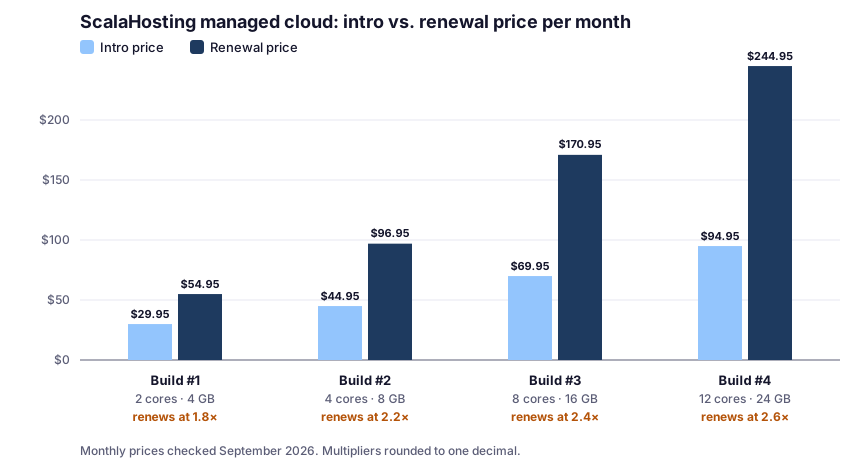
The pattern: the bigger the build, the bigger the renewal multiplier. Build #1 renews at about 1.8× its intro price; Build #4 at about 2.6×. For a year:
| Plan | A year at intro price | A year at renewal price |
|---|---|---|
| Build #1 | $359.40 | $659.40 |
| Build #2 | $539.40 | $1,163.40 |
Practical takeaway: size for today, not for a traffic level you hope to reach. Resources can be added later in minutes (see scaling below), so a larger build “just in case” mostly means paying a larger renewal.
SPanel vs. cPanel: What the Panel Costs You
On shared hosting, the control panel is bundled into the price. On a VPS, it’s often a separate license, and that changes the math.
cPanel’s monthly license prices (checked September 2026):
| cPanel license | Accounts | Monthly price |
|---|---|---|
| Solo | 1 | $29.99 |
| Admin | Up to 5 | $35.99 |
| Pro | Up to 30 | $53.99 |
What that means on a small VPS: a cPanel Admin license at $35.99/mo costs more than Build #1’s intro price. SPanel is included free with ScalaHosting, which built it as an alternative to rising cPanel prices.
What SPanel includes:
- SShield, an AI-powered security monitoring tool
- A WordPress manager for installation, management, and security
- Staging and cloning, plus WP-CLI and SSH access
- Backups you can configure and restore yourself (more below)
- A choice of web servers (more below)
- 400+ one-click app installs, unlimited email accounts and databases
The trade-off: SPanel is a different interface. If your workflow, scripts, or client handovers depend on cPanel specifically, that’s a real switching cost. See WordPress hosting with cPanel if cPanel is a must.
Choosing a Web Server in SPanel
This is one of the most practical reasons to be on a VPS: you choose the software that serves your site. SPanel’s Web Server Manager in the Admin Interface offers several setups:
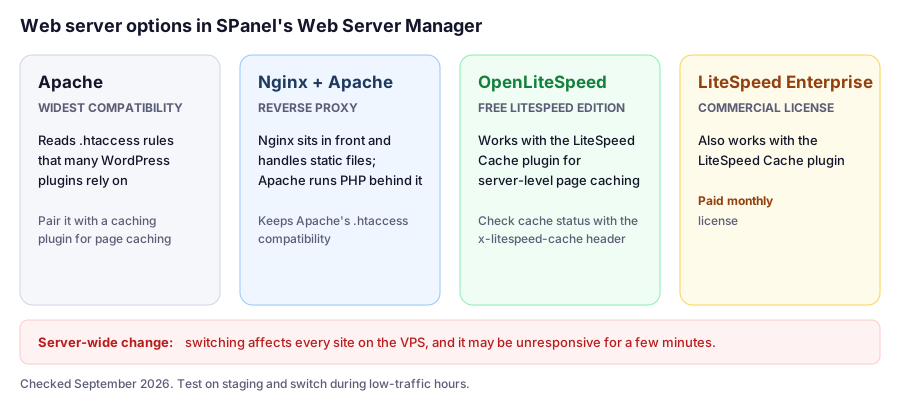
Which one I’d choose for WordPress:
- OpenLiteSpeed if you want server-level page caching without an extra license. It works with the LiteSpeed Cache plugin, and you can verify caching with the
x-litespeed-cacheresponse header. - LiteSpeed Enterprise if you want the commercial edition of LiteSpeed and can justify the monthly license. LiteSpeed add-ons run from $10 to $36 a month, depending on configuration.
- Nginx in front of Apache if you depend on complex
.htaccessrules but want static files served efficiently. - Apache alone only if a specific plugin or app requires it.
Checking That Page Caching Works
If you run OpenLiteSpeed or LiteSpeed Enterprise with the LiteSpeed Cache plugin, use the check from LiteSpeed’s documentation:
curl -sI https://yourdomain.com/ | grep -i x-litespeed-cacheRun it while logged out, twice. hit means the page came from cache. If you always see miss, something is wrong with the cache setup. On Apache or Nginx, check the documentation for whichever caching plugin you use, since the header names differ.
Scaling: Adding Resources Without Moving Servers
On the managed cloud, you add CPU or RAM from inside your account, without switching servers or downtime, and the automated upgrade takes 1–3 minutes. Custom builds are available too, not just the four preset plans.
Why that matters: on shared hosting, “upgrading” can mean moving to a different plan or server. Here, you can add resources to the same server ahead of a known busy period, such as a product launch or holiday sale, and you don’t need to guess years ahead when choosing a build.
How I’d use it: start on the smallest build that handles your current peak, watch CPU and RAM in SPanel, and add resources only when usage stays high after you’ve checked caching and slow plugins. Confirm how adding resources changes your bill before you do it.
Backups: Configurable, With a Retention Catch
Shared and managed VPS accounts get daily backups, stored on a remote server, and on the managed cloud you can set them to run daily or several times a day, kept off-site.
Restoring is done in SPanel under Files › Restore backup: pick a restore point, then browse files or databases. For databases, you can restore to the original database or import the data into a new database.
Why “restore into a new database” is useful: restoring over a live database wipes out everything since the backup, like today’s orders or comments. Restoring into a separate database lets you pull out just the data you need, such as a deleted page or a broken settings table, without rolling back the whole site.
Shared WordPress Plans (Briefly)
ScalaHosting also sells shared WordPress hosting: Mini ($2.95/mo, renews at $11.95), Start ($5.95/mo, renews at $14.95), and Advanced ($9.95/mo, renews at $19.95), with a 36-month option shown (checked September 2026). These aren’t where ScalaHosting stands out. For shared hosting, compare ChemiCloud or our cheap WordPress hosting guide.
Which Build Fits? Four Real-World Scenarios
These scenarios use ScalaHosting’s published prices and features. The site types are illustrative examples.
Scenario 1: A Growing Content Site Hitting Shared Limits
The site: a content site getting resource warnings on shared hosting, even with caching working.
Build: Build #1 (2 cores, 4 GB RAM). Enable OpenLiteSpeed and the LiteSpeed Cache plugin so most traffic never reaches PHP.
Cost: $359.40 for a year at the intro price, $659.40 a year at renewal.
Before you move: confirm the limits really are the problem. See shared hosting vs. VPS for how to tell a hosting problem from a site problem.
Scenario 2: An Agency Hosting 15 Client Sites
The situation: fifteen small business sites that you currently pay for as separate shared plans.
Build: Build #2 (4 cores, 8 GB RAM).
Cost per site: $44.95/mo ÷ 15 = about $3.00 per site at the intro price, and $96.95/mo ÷ 15 = about $6.46 per site at renewal.
The panel math: a cPanel license for 15 accounts would need at least the Pro tier, listed at $53.99/mo on monthly billing. With SPanel included, that cost disappears.
The catch: every site shares one server. A single compromised or runaway client site can affect the rest, and switching web servers affects all of them at once.
Scenario 3: A WooCommerce Store With Seasonal Peaks
The site: a store that’s steady most of the year but busy during holiday sales.
Build: Build #1 or #2 for normal traffic, based on current CPU and RAM usage.
The plan: ahead of a major sale, add CPU or RAM, which takes 1–3 minutes without downtime. Check how that changes your bill. Cart and checkout pages can’t be page-cached, so in a store, concurrency and CPU matter most during peaks.
Before every sale: take a manual backup and test checkout on staging.
Scenario 4: Leaving Shared Hosting at Renewal Time
The situation: your shared plan is up for renewal, and you’re wondering whether a VPS is worth it.
The comparison: SiteGround’s GoGeek plan renews at $44.99/mo, or $539.88 a year (checked September 2026). ScalaHosting Build #1 renews at $54.95/mo, or $659.40 a year. That’s $119.52 more a year for 2 dedicated CPU cores and 4 GB of RAM on your own server.
Worth it if: you’ve outgrown shared limits or run a store with real concurrency. Not worth it if: your site is simply slow because of heavy plugins or missing caching. A VPS won’t fix that.
Buying Details
- Refunds: ScalaHosting’s Terms of Service define an “anytime money-back guarantee”: a full refund within 30 days of purchase, or a partial refund for the unused portion at any time after activation. It covers web, reseller, and VPS hosting, for new clients only, and excludes dedicated servers, SSL certificates, domain registration, renewal or transfer, and software licenses. If you use the 30-day guarantee, you pay the domain’s normal price. ScalaHosting’s knowledge base article on refunds only mentions the 30-day window, so confirm the current terms.
- Support: 24/7/365 live chat, email, and ticketing, with an advertised average response time of about 15 seconds. There’s no phone support.
- Migration: free migration of websites, email, and apps, done with no downtime.
- Data centers: US locations in Dallas, New York, and Seattle (ScalaHosting’s own infrastructure), plus Ohio, Virginia, and Oregon (AWS); many in Europe, including London, Frankfurt, Amsterdam, Paris, Madrid, and Stockholm.
ScalaHosting Pros and Cons
Pros
- Dedicated VPS resources with the server managed for you
- SPanel included free, avoiding per-account cPanel license costs
- Choice of Apache, Nginx, OpenLiteSpeed, or LiteSpeed Enterprise
- Adding CPU or RAM takes minutes without downtime, per ScalaHosting
- Database restores into a new database, not only over the live one
- Full refund within 30 days and a partial refund for unused time afterward (per its Terms of Service)
- Many US and European data centers
Cons
- Renewals roughly double or more, up to 2.6× on Build #4
- A big price step up from shared hosting
- SPanel instead of cPanel
- Backup retention add-ons cost extra, and default retention isn't stated on the plan page
- Web server switches are server-wide
- No phone support; money-back guarantee is for new clients only
How ScalaHosting Compares
To compare VPS providers, including self-managed options, see our best VPS hosting guide. For whether you need a VPS at all, see shared hosting vs. VPS and managed vs. shared hosting.
FAQ
Is ScalaHosting good for WordPress?
It's a strong choice for WordPress sites that have outgrown shared hosting. Its managed cloud includes dedicated resources, SPanel with a WordPress manager and SShield security, a choice of web servers including OpenLiteSpeed, configurable backups, and free migration.
What is SPanel, and is it free?
SPanel is ScalaHosting's own control panel, included free for its clients, and built as an alternative to rising cPanel prices. On a VPS, a cPanel license is a separate cost: cPanel's Admin tier is $35.99/mo on monthly billing (checked September 2026).
Which web server should I use on ScalaHosting for WordPress?
For most WordPress sites, OpenLiteSpeed with the LiteSpeed Cache plugin gives server-level page caching without a paid license. Switching web servers in SPanel is server-wide and, per ScalaHosting, may make the VPS briefly unresponsive, so test first and switch during quiet hours.
Can I add resources to a ScalaHosting managed cloud VPS later?
Yes. CPU and RAM can be added from inside your account without switching servers or downtime, and the automated upgrade takes 1–3 minutes. Custom builds are available too.
How much does ScalaHosting cost after renewal?
As of September 15, 2026, managed cloud builds renew at $54.95/mo (Build #1), $96.95/mo (Build #2), $170.95/mo (Build #3), and $244.95/mo (Build #4), roughly 1.8× to 2.6× their intro prices.
What is ScalaHosting's anytime money-back guarantee?
A full refund within 30 days of purchase, or a partial refund for the unused portion of service at any time after activation. It applies to web, reseller, and VPS hosting for new clients only.
How do I restore a backup in SPanel?
In SPanel, go to Files, then Restore backup, choose a restore point, and browse files or databases. Databases can be restored to the original or imported into a new one.
Final Verdict
ScalaHosting’s managed cloud is a practical next step for WordPress sites that genuinely need more than shared hosting. You get dedicated resources, a capable free control panel that sidesteps cPanel license costs, a real choice of web server, and scaling that doesn’t force a migration. Its refund terms also lower the risk of trying a VPS.
Plan around the renewal prices, start with the smallest build that handles your current peak, and treat server-wide changes like switching web servers with care. Do that, and ScalaHosting is one of the most sensible managed VPS options we cover.