Managed vs Shared Hosting: Which Do You Actually Need?
Some links on this page are affiliate links. If you buy through them, we may earn a commission at no extra cost to you. It never decides what we recommend —read how we make money.
“Should I get managed hosting or shared hosting?” is one of the most common questions people ask when they launch a WordPress site. It’s also a slightly misleading question, because managed and shared aren’t opposites. They answer two different questions, and most beginner WordPress plans are both at once.
This guide separates the two questions, shows exactly who is responsible for what on each type of hosting, explains how “shared” accounts are actually kept apart, and walks through four common situations with real prices.
The Short Answer
- “Shared” is about resources. Your site runs on a server alongside other customers’ sites.
- “Managed” is about responsibility. The host maintains the server, and with managed WordPress hosting, often WordPress-specific tools like caching and backups too.
- Most beginner WordPress plans are shared and host-maintained. SiteGround’s and Hostinger’s WordPress plans are typical examples.
- The real choice comes later: when a site outgrows shared resources, do you move to a managed VPS, where the host still runs the server, or an unmanaged VPS, where you do?
Two Questions, Four Kinds of Hosting
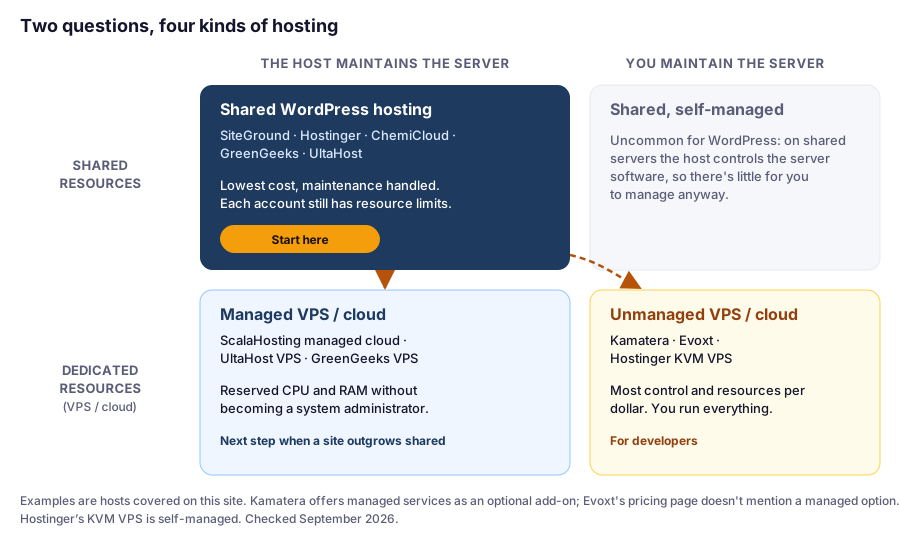
Question 1: Do you share the server?
- Shared hosting: many accounts on one server, each with its own limits. It’s the cheapest option, because the server’s cost is spread across many customers.
- VPS or cloud hosting: your virtual server has its own allocated CPU, RAM, and storage.
Question 2: Who maintains it?
- The host: keeps the operating system, web server, PHP, and security up to date, and usually provides backups and caching tools.
- You: you get a raw server and install, secure, and update everything yourself.
Most people start in the top-left box. The “managed vs. shared” question usually turns into “which bottom box should I move to?” only once a site grows.
Who Handles What? The Responsibility Map
“Managed” means different things at different hosts, so here’s the practical version: who is responsible for each part of running a WordPress site. The examples come from hosts we cover, checked September 2026.
| Task | Shared WordPress hosting | Managed VPS | Unmanaged VPS |
|---|---|---|---|
| Server OS and security patches | Host | Host (UltaHost’s team handles installation, configuration, updates, and monitoring) | You (Kamatera offers managed services as an optional add-on) |
| Web server and PHP | Host runs them; you pick a PHP version (SiteGround also offers Managed PHP updates) | Host runs them; you may choose the web server (ScalaHosting’s SPanel offers several) | You install and configure them |
| Firewall and malware protection | Host (SiteGround: WAF and AI bot protection; Hostinger: malware scanning) | Host (ScalaHosting’s SShield; UltaHost: DDoS protection) | You |
| SSL certificates | Host, free on the hosts we cover | Host, free SSL listed | You set up and renew |
| Backups | Included (SiteGround: daily; Hostinger: weekly on Premium, daily on Unlimited) | Included (ScalaHosting: configurable; UltaHost: weekly) | Sometimes included (Evoxt: weekly off-site backups; Hostinger KVM: weekly), otherwise yours |
| Page caching | Tools provided (SiteGround Speed Optimizer; Hostinger LiteSpeed) | Tools provided, often more choice | You configure it |
| Server monitoring | Host (SiteGround: 24/7 proactive monitoring) | Host (UltaHost: 24 hours a day) | You |
| WordPress core, themes, and plugins | You, with help (SiteGround has managed auto-updates) | You, often with a WordPress manager | You |
| Your content and site design | You | You | You |
Two things this table makes clear:
- “Managed” never means “hands-off.” On every type of hosting, your WordPress plugins, theme, and content are yours to keep updated and secure.
- The real line is below WordPress. With managed hosting, the operating system, web server, PHP, firewall, and SSL are someone else’s job. With unmanaged hosting, they’re yours, and they’re exactly the parts that cause security problems when neglected.
“Shared” Doesn’t Mean “No Limits Between Accounts”
A common worry about shared hosting is that a noisy neighbor will slow your site down. Hosts address this by giving each account its own limits, so one busy account can’t use the whole server. How they express those limits differs:
| Host | How limits are expressed | Example (entry plan) |
|---|---|---|
| SiteGround | CPU time per hour/day/month, plus inodes | 1,000 CPU seconds per hour; 200,000 inodes |
| Hostinger | CPU cores, RAM, and PHP workers | 1 core, 2 GB RAM, 40 PHP workers |
| ChemiCloud | CloudLinux limits: CPU %, RAM, entry processes, I/O | 100% CPU, 2 GB RAM, 10 entry processes |
From each host’s published limits, checked September 2026.
What this means for you: the limits that protect you from neighbors are the same limits your own site can hit. They cap how much work your account can do, either over time or all at once. That’s why caching matters so much on shared hosting. Cached pages barely touch any of these limits, while uncached traffic, like logged-in users, carts, and checkouts, uses them up.
For how each host’s limits work in practice, see our reviews of SiteGround, Hostinger, and ChemiCloud.
What Each Option Costs
| Option | Example | Intro price | Renews at |
|---|---|---|---|
| Shared WordPress | SiteGround StartUp | $2.99/mo (12 months) | $17.99/mo |
| Shared WordPress | Hostinger Premium | $2.99/mo (48 months) | $10.99/mo |
| Managed VPS | ScalaHosting Build #1 (2 cores, 4 GB) | $29.95/mo | $54.95/mo |
| Managed VPS | UltaHost VPS Business (2 cores, 2 GB) | $9.78/mo (24 months) | Confirm at checkout |
| Unmanaged VPS | Hostinger KVM 1 (1 vCPU, 4 GB) | $6.49/mo | $11.99/mo |
| Unmanaged cloud | Kamatera (1 vCPU, 1 GB) | From $4/mo | Pay-as-you-go |
Prices checked September 2026. Terms, refund rules, and included services differ; see each host’s review.
The pattern:
- Shared WordPress hosting is the cheapest maintained option.
- Managed VPS costs more because you pay for reserved resources and someone else running the server. Prices vary widely, so compare what “managed” includes, not just the price.
- Unmanaged VPS is cheap in dollars and expensive in time. Hostinger’s KVM 1 gives you 4 GB of RAM for $6.49/mo, but everything in the right-hand column of the responsibility map is yours.
Which Fits? Four Real-World Scenarios
These scenarios use prices verified in September 2026. The site types are illustrative examples.
Scenario 1: A First Blog or Small Business Site
Pick: shared WordPress hosting.
Why: nothing about a new site needs dedicated resources, and the host handles the server-level work you’d otherwise have to learn. SiteGround StartUp costs $35.88 for the first year; Hostinger Premium costs $143.52 for four years upfront.
Next step: read SiteGround vs Hostinger to choose between the two most common starting points.
Scenario 2: A Freelancer Hosting 20 Small Client Sites
Two sensible options:
- One shared plan with unlimited sites, such as Hostinger Unlimited ($16.99/mo at renewal, about $0.85 per site). Cheapest by far, but all 20 sites share one account’s limits, including 60 PHP workers, and the PHP version applies to every site on the plan.
- A managed VPS, such as ScalaHosting Build #2 (4 cores, 8 GB RAM; $96.95/mo at renewal, about $4.85 per site). More expensive, but the resources are reserved for your server, and you control the software for all of them.
How to decide: if the sites are small brochure sites and one client’s traffic spike wouldn’t hurt the others much, shared hosting is fine. If clients have real traffic, stores, or strict uptime needs, the managed VPS isolates you from other customers, though not your sites from each other.
Scenario 3: A Busy WooCommerce Store
Pick: a managed VPS, once the store regularly hits shared limits despite caching.
Why: carts, checkouts, and account pages can’t be page-cached, so a busy store generates constant uncached work. Reserved CPU and RAM, like ScalaHosting Build #1’s 2 cores and 4 GB, handle that better, and the host still maintains the server.
Before upgrading: confirm that caching works on product and category pages, and check for slow plugins. See shared hosting vs. VPS for how to tell a hosting problem from a site problem.
Scenario 4: A Developer’s Side Project
Pick: an unmanaged VPS, if you’re comfortable running Linux.
Options: Hostinger KVM 1 for 4 GB of RAM at $6.49/mo, or Kamatera’s configurable servers with a 30-day free trial worth up to $100 on one server.
Be honest about the workload: you’re signing up for everything in the “Unmanaged VPS” column above. Our best VPS hosting guide includes a checklist of what to set up before launching WordPress on a self-managed server.
Which Should You Choose?
- First site, or you don’t want to think about servers: shared WordPress hosting. Our first pick for beginners is SiteGround; if long-term cost matters most, Hostinger.
- Outgrown shared hosting, and you don’t want to manage a server: a managed VPS, such as ScalaHosting’s managed cloud.
- You’re a developer who wants full control: an unmanaged VPS, such as Kamatera.
- Not sure? Start on shared hosting. Moving up later is straightforward, and several hosts advertise free migrations. Starting too big mostly means paying for resources you don’t use.
For all our picks by situation, see our WordPress hosting comparison.
FAQ
What is the difference between managed and shared hosting?
Shared hosting is about resources: many accounts share one server, each with its own limits. Managed hosting is about responsibility: the host maintains the server and often provides WordPress tools like caching and backups. They aren't opposites; most beginner WordPress plans are both.
Does managed hosting mean I don't have to maintain WordPress?
No. Managed hosting covers the server: operating system, web server, PHP, security, and usually backups. Your WordPress plugins, theme, and content are still yours to keep updated, though some hosts, like SiteGround, list managed auto-updates to help.
Will other sites on a shared server slow mine down?
Hosts limit each account's resources so one account can't take over a server. SiteGround limits CPU time, Hostinger limits cores, RAM, and PHP workers, and ChemiCloud uses CloudLinux limits like entry processes. Those same limits are what your own site can hit, which is why caching matters.
Is shared hosting good enough for WordPress?
For most new blogs, portfolios, and small business sites, yes. You may need more resources later if traffic grows significantly or you run something with lots of uncached traffic, like a busy WooCommerce store.
What is the difference between managed and unmanaged VPS?
Both give you dedicated resources. With a managed VPS, the host maintains the server software and security. With an unmanaged VPS, you install, secure, update, and back up everything yourself.
Should a beginner use an unmanaged VPS?
Generally no. An unmanaged VPS makes you responsible for server security, updates, SSL, and backups. Beginners are better served by shared WordPress hosting, moving to a managed VPS later if needed.
The Bottom Line
Stop thinking “managed or shared.” For a new WordPress site, the best value is almost always shared WordPress hosting maintained by the host. When a site genuinely outgrows shared limits, the choice becomes managed VPS (the host still runs the server) or unmanaged VPS (you do). Whichever you choose, remember the line in the responsibility map: your WordPress site itself is always your job.
Before you buy, check our list of what you need before installing WordPress.