Hostinger Review (2026): Pricing, Renewals, Pros & Cons
Some links on this page are affiliate links. If you buy through them, we may earn a commission at no extra cost to you. It never decides what we recommend —read how we make money.
Hostinger is usually the first name that comes up when someone asks for cheap WordPress hosting, and its prices back that up. What most reviews don’t explain is how Hostinger gets there. The answer is a long prepaid term, clearly defined resource limits, and a LiteSpeed-based caching stack that does a lot of the heavy lifting.
This review goes through each of those: what four years of Hostinger actually costs, what its resource limits mean for a real WordPress site, how to check that caching is working, what its backups cover, and which plan fits four common types of site owners.
Hostinger combines very low long-term pricing with published resource limits and a LiteSpeed caching stack you can verify in a minute. The trade-offs are a four-year upfront commitment for the best price, weekly-only backups on Premium, and no phone support. For most sites, Unlimited is the plan to get: it adds daily backups, staging, object caching, and 50% more PHP workers for $1/mo more.
Best for
- Getting a WordPress site online for the lowest long-term cost
- Running a few small sites, or many on the Unlimited plan
- People comfortable committing to a multi-year term to lock in low prices
Not for
- Anyone who wants the option to leave after a year without having prepaid four
- Sites that need daily backups on the cheapest plan (Premium has weekly)
- People who want phone support
Price: From $2.99/mo on a 48-month term ($143.52 upfront) · renews at $10.99/moPrices checked: September 2026
How We Evaluated Hostinger
I focus on what decides how a WordPress site behaves on a host: resource limits, caching, backups, and PHP. That comes from my background as a front-end developer since 2016, including custom WordPress and theme development.
Prices, plan limits, and policies here were checked in September 2026. Hostinger changes its promotions often, so confirm the final price at checkout.
Hostinger Plans and What You Really Pay
| Plan | Intro price | Paid upfront (48 months) | Renews at |
|---|---|---|---|
| Premium | $2.99/mo | $143.52 | $10.99/mo |
| Unlimited | $3.99/mo | $191.52 | $16.99/mo |
| Cloud Startup | $7.99/mo | $383.52 | $25.99/mo |
Intro prices shown for a 48-month term. Prices checked September 2026.
Hostinger’s pricing works differently from hosts that discount only the first year. You pay for four years at once, and nothing more is due until the term ends:
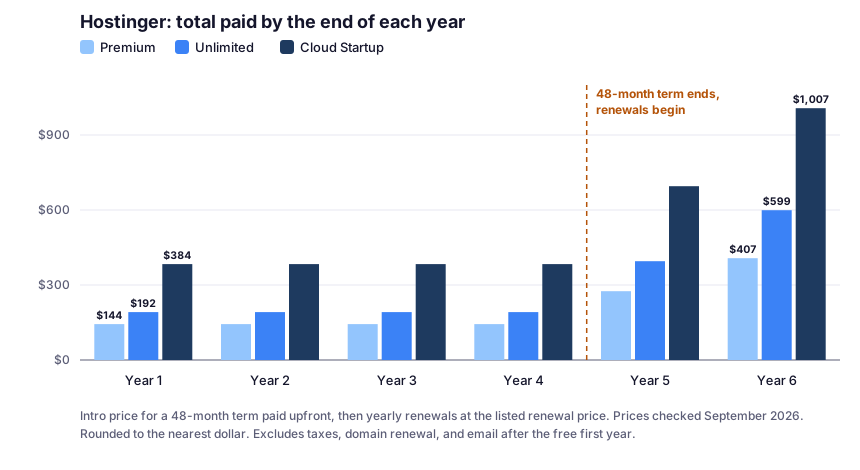
What the chart shows:
- Years 1–4 are already paid. Premium costs $143.52 for all four years, about $36 a year.
- Renewal prices are still low. Even after renewals begin, Premium adds $131.88 a year, less than a year of renewal on SiteGround’s, ChemiCloud’s, or GreenGeeks’ entry plans.
- The risk is at the start, not the end. After the refund window closes, the full four years are spent even if you stop using the site in month six.
The Break-Even Question
Compared with a host that bills a one-year intro term and then renews yearly, a 48-month prepayment costs more on day one and less every year after. For example, against SiteGround’s StartUp plan (verified the same day):
| By the end of… | Hostinger Premium (paid) | SiteGround StartUp (paid) |
|---|---|---|
| Year 1 | $143.52 | $35.88 |
| Year 2 | $143.52 | $251.76 |
| Year 4 | $143.52 | $683.52 |
If you’ll keep the site for more than a year, Hostinger’s structure wins on cost. If you might abandon the project, the cheaper first-year bill elsewhere is the safer bet. For a full comparison, see SiteGround vs Hostinger.
The Resource Limits That Decide Your Plan
Hostinger publishes detailed limits for each plan. These tell you far more about what a plan can handle than “unlimited bandwidth” does:
| Limit | Premium | Unlimited |
|---|---|---|
| Websites | 3 | Unlimited |
| Storage | 20 GB | 50 GB |
| CPU cores | 1 | 2 |
| RAM | 2 GB | 3 GB |
| PHP workers | 40 | 60 |
| Inodes (files and folders) | 400,000 | 600,000 |
| PHP memory limit | 1,536 MB | 2,048 MB |
| Max execution time | 360 seconds | 360 seconds |
| Databases | 10 | 150 |
Limits checked September 2026. Cloud Startup, one tier up, comes with 4 CPU cores, 4 GB RAM, and 100 GB storage.
PHP Workers: The Limit Most People Overlook
CPU and RAM get the attention, but for WordPress, PHP workers are often the limit you feel first.
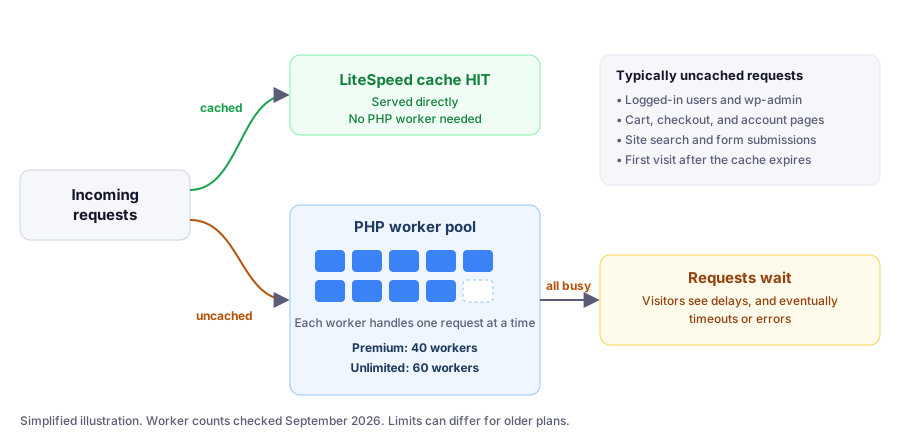
Here’s how it works:
- A PHP worker is a process that runs WordPress to build a page. Each one handles one request at a time.
- Cached pages don’t need a worker. LiteSpeed serves them directly, which is why caching matters so much.
- Uncached requests do. That includes logged-in users, wp-admin, cart and checkout pages, site searches, and form submissions.
- When every worker is busy, new requests wait, and visitors see delays or timeouts.
What this means in practice: a blog with mostly anonymous readers can serve a lot of traffic on 40 workers, because most requests hit the cache. A store where many shoppers are checking out at once needs far more workers per visitor. That’s the difference between Premium and Unlimited that matters most for dynamic sites.
What Happens When You Hit a Limit
Hostinger’s published limits:
| Limit reached | What visitors experience |
|---|---|
| CPU | The site slows down and requests are scheduled instead of served instantly |
| RAM or processes | 503 Service Unavailable errors |
| PHP workers | Delays or timeouts |
| I/O | The site slows down |
How to check your usage: in hPanel, go to Websites → Dashboard → Hosting plan → Resources Usage. The graphs show CPU, memory, PHP workers, disk and inode usage, I/O, and processes, with a red line marking your plan’s limit.
When it’s time to upgrade: Hostinger’s guidance is to keep CPU usage below 80% during peak hours, and to move up a plan if RAM or process limits are hit 10–20 times a month. Before that, it’s worth reviewing your code, reducing plugins, minimizing cron jobs, and enabling caching.
How Hostinger’s Caching Works
Hostinger runs on LiteSpeed servers, and its caching has three separate parts. Knowing which is which saves a lot of confusion when a change “doesn’t show up”:
- LiteSpeed web server cache (Cache Manager). Cache Manager controls only the LiteSpeed web server cache and stores your site’s static content, updating it every 30 minutes. Turn it on in hPanel under Websites → Dashboard → Cache Manager, and purge the whole site or a single URL there.
- Object cache. Stores frequently used database results in memory. It’s available on Web Business plans or greater (Unlimited, now that it replaces Business) and is enabled through the LiteSpeed feature in hPanel’s WordPress Overview, with the LiteSpeed Cache plugin enabling it by default.
- CDN and PHP OPcache. Both are separate systems. Hostinger notes that Cache Manager doesn’t affect the CDN or OPcache.
How to Check Hostinger’s Cache Is Working (60 Seconds)
There’s a simple check:
- Open your site in a private or incognito window. Logged-in users typically bypass the cache.
- Open DevTools (F12), go to the Network tab, and reload.
- Click the first request, the page itself, and look at Response Headers.
- Find
x-litespeed-cache:hit: served from cachemiss: not served from cache this time. Reload and check again.
From the command line:
curl -sI https://yourdomain.com/ | grep -i x-litespeed-cacheInterpreting the result: if you always see miss, something is wrong with the cache configuration. If the header doesn’t appear at all, the page isn’t being cached. Note that a CDN in front of your site can add or change cache headers.
Backups: Know Which Plan You’re On
This is where Hostinger’s plans differ most, and where I’d be most careful.
| Premium | Unlimited | Cloud Startup | |
|---|---|---|---|
| Automatic backups | Weekly | Daily | Daily |
| On-demand backups | — | — | ✓ |
Checked September 2026.
- Weekly backups are included on all web hosting plans.
- Daily backups are included on Web Business plans and greater (Unlimited today), and are kept for the last 7 days.
- Premium users can buy daily backups as an add-on.
- Restores are done from Websites → Dashboard → Backups in hPanel.
Why weekly backups worry me: if a bad update breaks your site on a Saturday and the last backup ran on Monday, restoring means losing almost a week of posts, comments, or orders. For any site that changes more than occasionally, I’d get daily backups, either by choosing Unlimited or buying the add-on. As a backstop, add a backup plugin that stores copies off-server.
Staging on Hostinger
The WordPress staging tool is available on the Business web hosting plan or higher. Since Unlimited has replaced Business, that means Unlimited and up. Confirm it appears in your hPanel before relying on it.
Staging gives you a private copy of your site to test plugin updates, theme changes, or a redesign before they reach visitors. On Premium, the practical alternative is a manual backup right before each update.
PHP Versions: One Setting, Every Site
You change PHP in hPanel under Websites → Dashboard → PHP Configuration: select a version and click Update. Two details matter:
- PHP versions below 8.2 are deprecated and no longer available to select.
- The version applies to all websites on your hosting plan (except sites built with Hostinger’s AI Builder).
Why that second point matters: on Premium, all three sites switch PHP versions together. If one site runs an old plugin that breaks on a newer PHP, upgrading PHP for the other two will affect it too. Before changing PHP, check every site on the plan, not just the one you’re working on. You can confirm each site’s PHP version under Tools › Site Health › Info › Server in WordPress.
Which Plan Fits? Four Real-World Scenarios
These scenarios use Hostinger’s published prices and limits. The site types are illustrative examples.
Scenario 1: A Personal Blog on a Tight Budget
The site: one or two blogs, mostly anonymous readers, updated a few times a month.
Plan: Premium. Most requests are cacheable, so 40 PHP workers go a long way.
Cost: $143.52 for four years, then $10.99/mo.
Do this: turn on Cache Manager and the LiteSpeed Cache plugin, confirm x-litespeed-cache: hit, and cover the weekly backup gap with the daily backup add-on or a backup plugin.
Scenario 2: A Small Business With Several Sites
The site: a company site plus two or three small side sites, where downtime or lost form entries would hurt.
Plan: Unlimited. Daily backups, staging, object cache, 60 PHP workers, and 150 databases for $1/mo more than Premium ($48 more over four years).
Cost: $191.52 for four years, then $16.99/mo.
Do this: test plugin updates on staging, and before changing PHP, remember the setting applies to every site on the plan.
Scenario 3: A Small WooCommerce Store
The site: a store with a few hundred products and regular orders.
Plan: Unlimited to start. Cart and checkout pages can’t be cached, so each active shopper uses PHP workers. Object caching helps those uncached pages do less database work.
When to move up: watch Resources Usage. Following Hostinger’s own guidance, if RAM or process limits are hit 10–20 times a month, or CPU stays above 80% at peak, consider Cloud Startup (4 CPU cores, 4 GB RAM, 100 GB storage, daily and on-demand backups): $383.52 for four years, then $25.99/mo. See shared hosting vs. VPS if you outgrow that too.
Scenario 4: You’re Not Sure the Project Will Last
The situation: a new idea you’re testing, which you might abandon within a year.
What to know: the 48-month price is only a bargain if you stay. After the refund window, you’ve spent $143.52 even if you stop in month three. Use the 30-day money-back window to decide quickly. If the project really is a short experiment, a host with a one-year intro term costs less upfront.
Buying Details
- Refunds: 30-day money-back guarantee on new purchases and renewals of web and cloud hosting. Crypto payments aren’t refundable, and a claimed free domain’s standard price is deducted.
- Payments: major cards, plus PayPal, Apple Pay, and Google Pay (availability varies by region), and cryptocurrency.
- Support: 24/7 support with no phone line. Chat starts with Hostinger’s AI assistant, and a human specialist can join.
- Control panel: hPanel, not cPanel.
- Data centers: US (Phoenix, Boston, Asheville) and Europe (France, Germany, Lithuania, the Netherlands, the UK), among others. You can move an active plan to another location from hPanel.
- Migration: free automatic website migration.
Hostinger Pros and Cons
Pros
- Lowest long-term cost among the managed WordPress hosts we cover
- Published limits, including CPU, RAM, PHP workers, and inodes
- LiteSpeed caching you can verify with one response header
- Unlimited adds daily backups, staging, object cache, and 60 PHP workers for $1/mo more
- Detailed resource usage graphs in hPanel
- Flexible payments, including PayPal (region-dependent)
Cons
- Best price requires paying 48 months upfront
- Premium only has weekly backups
- Changing PHP affects every site on the plan
- Limits vary by plan version and purchase date
- No phone support
- Crypto purchases aren't refundable
How Hostinger Compares
For a head-to-head on cost, backups, and support, see SiteGround vs Hostinger. For other low-cost options, see our cheap WordPress hosting comparison, and for every host we cover, our WordPress hosting comparison.
FAQ
Is Hostinger good for WordPress?
Yes, especially if cost matters. Hostinger runs on LiteSpeed servers with caching you can verify, publishes clear resource limits, and offers low long-term pricing. Choose Unlimited or higher if you want daily backups, staging, and object caching.
What are PHP workers on Hostinger?
PHP workers are processes that run WordPress to build uncached pages, each handling one request at a time. Premium comes with 40 and Unlimited with 60 (checked September 2026). When all are busy, requests wait, and visitors can see delays or timeouts.
How do I check if Hostinger's cache is working?
Open your site logged out, in a private window, check the page's response headers in DevTools, and look for x-litespeed-cache. A value of hit means the page came from cache. Always seeing miss means something is wrong with the cache setup.
Does Hostinger have daily backups?
Daily backups are included on Web Business plans and greater, which today means Unlimited and up, and they're kept for 7 days. Premium includes weekly backups, and daily backups can be bought as an add-on.
What is Hostinger's renewal price?
As of September 15, 2026, Hostinger's WordPress plans renew at $10.99/mo (Premium), $16.99/mo (Unlimited), and $25.99/mo (Cloud Startup). The intro prices of $2.99, $3.99, and $7.99/mo apply to a 48-month term.
What happened to Hostinger's Business plan?
Since July 2026, Unlimited replaces Business as the plan sold on most web hosting pages. Features described as Business or higher, such as staging and object cache, now mean Unlimited and up.
Does Hostinger have phone support?
No. Hostinger confirms it doesn't offer phone support. Support is available 24/7 online, starting with an AI assistant, with human specialists able to join.
Final Verdict
Hostinger’s low prices aren’t a trick, but they do come with a specific shape: pay four years upfront, then renew at rates that are still lower than many rivals’. Behind that is a genuinely capable platform, with LiteSpeed caching you can verify, published resource limits, and useful usage graphs.
The details decide whether it fits you. Premium’s weekly backups and 40 PHP workers are fine for a mostly cached blog, but most sites are better served by Unlimited: daily backups, staging, object caching, and 60 workers for $1 more a month. Just be sure you’ll stay long enough for the four-year price to pay off.