SiteGround vs Hostinger (2026): Which Is Better for You?
Some links on this page are affiliate links. If you buy through them, we may earn a commission at no extra cost to you. It never decides what we recommend —read how we make money.
SiteGround and Hostinger are two of the most recommended hosts for WordPress beginners, and they win for different reasons. Most comparisons line up their feature lists side by side. This one does something more useful: it compares what it’s like to do the same everyday jobs on each host, from restoring a backup to checking that caching works. It also shows what each costs over six years, not six months.
For the full detail on either host, see our SiteGround review and Hostinger review.
The Quick Answer
| Choose SiteGround if you… | Choose Hostinger if you… |
|---|---|
| Don’t want to prepay four years | Are comfortable prepaying 48 months for the best price |
| Want daily backups on the cheapest plan | Want the lowest total cost over several years |
| Want phone support as an option | Are fine with 24/7 chat support and no phone |
| Want staging from the mid-tier plan with a selective deploy | Want to run up to 3 sites on the entry plan |
| Prefer paying by card | Want to pay with PayPal, Apple Pay, or Google Pay (where available) |
How We Compared
Prices, plan limits, and policies here were checked in September 2026. The analysis comes from my background as a front-end developer since 2016, including custom WordPress and theme development.
Cost: Two Very Different Pricing Shapes
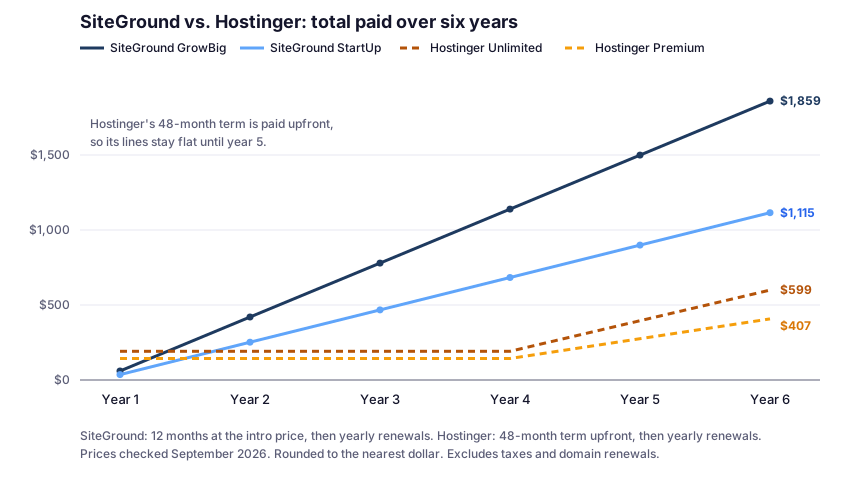
Both hosts discount your first term, but in different ways. SiteGround discounts 12 months, then renews yearly. Hostinger discounts 48 months, paid upfront. That difference changes everything over time:
| Plan pair | Intro price | Renews at | 6-year total |
|---|---|---|---|
| SiteGround StartUp | $2.99/mo (12 months) | $17.99/mo | $1,115.28 |
| Hostinger Premium | $2.99/mo (48 months) | $10.99/mo | $407.28 |
| SiteGround GrowBig | $4.99/mo (12 months) | $29.99/mo | $1,859.28 |
| Hostinger Unlimited | $3.99/mo (48 months) | $16.99/mo | $599.28 |
Prices checked September 2026. Totals assume yearly renewals after the intro term; exclude taxes and domains.
What this means:
- Over the long run, Hostinger costs far less. The gap between GrowBig and Unlimited reaches about $1,260 by year six.
- In year one, SiteGround asks for less money. StartUp’s first year is $35.88; Hostinger Premium needs $143.52 upfront.
- Hostinger only wins if you stay. After the 30-day refund window, its four years are paid whether you use them or not. If there’s a real chance you’ll abandon the site within a year, SiteGround’s smaller first bill is the safer bet.
Backups: Restoring Yesterday’s Site
The job: a plugin update broke your site this morning, and you want yesterday’s version back.
| SiteGround | Hostinger | |
|---|---|---|
| Automatic backups (entry plan) | Daily, up to 30 copies | Weekly (Premium) |
| Automatic backups (mid plan) | Daily, up to 30 copies | Daily, kept 7 days (Unlimited) |
| Where backups are stored | A different server, usually in another location | Not detailed in the help articles we checked |
| Manual backups | 5 free slots on GrowBig and GoGeek; StartUp only with the paid Premium Backup add-on* | On-demand backups on Cloud Startup |
| Restore granularity | Everything, or specific files, databases, or email accounts | Restore from hPanel’s Backups section |
| Where to restore | Site Tools › Security › Backups | Websites › Dashboard › Backups |
*Per SiteGround’s backup documentation, checked September 2026. Premium Backup gives StartUp 5 manual slots and GrowBig or GoGeek 10.
The practical difference: on SiteGround, yesterday’s backup exists on every plan. On Hostinger Premium, the most recent backup could be up to a week old, unless you add Hostinger’s daily backup add-on. On Hostinger Unlimited, you have daily backups, but a problem you don’t notice for more than a week falls outside the 7-day window. SiteGround’s 30 days of history covers slow-to-notice problems like malware or quietly corrupted data.
Staging: Testing an Update Safely
The job: you want to test a big plugin or theme update before it touches the live site.
| SiteGround | Hostinger | |
|---|---|---|
| Plans with staging | GrowBig and GoGeek | Business web hosting or higher, which today means Unlimited and up |
| Where | Site Tools › WordPress › Staging | hPanel’s WordPress staging tool |
| Deploy options | Full Deploy, or Custom Deploy to pick specific files and database tables | See Hostinger’s staging guide |
| Safety net | A live-site backup is created automatically on every deploy | Take a backup first |
Why SiteGround’s Custom Deploy matters: a full deploy replaces your live database with the staging copy. On a site that got new comments, form entries, or orders while you were testing, that newer data would be overwritten. Custom Deploy lets you push only what you changed, such as theme or plugin files.
Caching: Checking That It Actually Works
The job: confirm that visitors are getting cached pages, not making the server rebuild every page.
| SiteGround | Hostinger | |
|---|---|---|
| Page cache | Dynamic Caching (via Speed Optimizer) | LiteSpeed web server cache (Cache Manager / LiteSpeed Cache plugin) |
| Object cache | Memcached | Object cache on Web Business plans or greater (Unlimited and up) |
| Header to check | x-proxy-cache: HIT |
x-litespeed-cache: hit |
| Default cache refresh | Pages cached 12 hours | Cache Manager updates static content every 30 minutes |
| Clear the cache | Automatic on content updates, Site Tools › Caching, or wp sg purge |
Cache Manager (whole site or one URL), or the LiteSpeed Cache plugin |
The 60-second check (either host): open your site in a private window, open DevTools › Network, reload, and look at the page request’s response headers. Or from a terminal:
curl -sI https://yourdomain.com/ | grep -iE "x-proxy-cache|x-litespeed-cache"Run it twice. A cache hit on the second request means caching works. If you only ever see misses on public pages, fix that before you think about upgrading plans.
PHP Versions: One Site or All of Them?
The job: move your site to a newer PHP version.
| SiteGround | Hostinger | |
|---|---|---|
| Where | Site Tools › Devs › PHP Manager | Websites › Dashboard › PHP Configuration |
| Automatic updates | Managed PHP moves you to newer stable defaults | Choose the version yourself |
| Scope | Per site | Applies to all websites on the plan (except AI Builder sites) |
| Old versions | Choose manually if needed | Versions below 8.2 are no longer selectable |
The catch on Hostinger: because one setting covers every site on the plan, a PHP upgrade for one site also upgrades the others. If one of your three Premium sites runs an old plugin that breaks on newer PHP, check it before you change the version. On either host, confirm each site’s version under Tools › Site Health › Info › Server in WordPress.
Resource Limits: Why They’re Hard to Compare Directly
The job: figure out whether your plan can handle your site.
The two hosts publish different kinds of limits, so the numbers don’t line up one to one:
| SiteGround (entry / mid) | Hostinger (entry / mid) | |
|---|---|---|
| What’s measured | CPU time: 1,000 / 2,000 CPU seconds per hour | CPU cores: 1 / 2 |
| Concurrency | Not stated as a number | PHP workers: 40 / 60 |
| RAM | Up to 768 MB per process | 2 GB / 3 GB for the account |
| Inodes | 200,000 / 400,000 | 400,000 / 600,000 |
| Where to see usage | Warnings under the fair use policy | Websites › Dashboard › Hosting plan › Resources Usage graphs |
SiteGround: fair use policy. Hostinger: plan parameters help article. Both checked September 2026.
How to read this as a developer:
- SiteGround limits how much work you do over time. A traffic spike that runs a lot of uncached PHP can burn through an hour’s CPU seconds.
- Hostinger limits how much work you do at once. When all PHP workers are busy, new uncached requests wait.
- Either way, caching decides how far a plan goes. Cached pages use almost no CPU time and no PHP workers. Stores and membership sites, whose carts, checkouts, and logged-in pages can’t be cached, hit both kinds of limits sooner.
Hostinger’s resource graphs make it easier to see where you stand, and its published inode limits are higher on both plan tiers shown here.
Support: Getting Help
| SiteGround | Hostinger | |
|---|---|---|
| Availability | 24/7 | 24/7 |
| Live chat | ✓ (primary channel) | ✓ (starts with an AI assistant; a human specialist can join) |
| Phone | ✓ English only; may be routed elsewhere for complex issues | ✗ |
| Tickets | ✓ | Not detailed in the articles we checked |
| Priority support | GoGeek plan | Plans list “priority 24/7 expert support” |
If being able to call someone matters, SiteGround is the only choice of the two.
Paying and Refunds
| SiteGround | Hostinger | |
|---|---|---|
| At checkout | VISA, MasterCard, American Express, Discover | Cards, plus PayPal, Apple Pay, and Google Pay (region-dependent), and crypto |
| PayPal | Arranged through support (how it works) | At checkout, where available |
| Money-back guarantee | 30 days on shared hosting | 30 days on web and cloud hosting |
| Not refunded | Domain fees; paid support and third-party services | Crypto purchases; a claimed free domain’s price is deducted |
Which Should You Pick? Three Real-World Scenarios
These scenarios use prices and features verified in September 2026. The site types are illustrative examples.
Scenario 1: A New Blog You Might Not Keep
Pick: SiteGround StartUp.
Why: $35.88 for the first year versus $143.52 upfront at Hostinger. If the blog doesn’t work out after a year, you’ve spent far less, and you still had daily backups the whole time.
When Hostinger becomes the better deal: if you’re confident you’ll keep the site for two years or more, Hostinger Premium costs less by the end of year two ($143.52 vs. $251.76).
Scenario 2: A Small Business Site That Must Not Lose Data
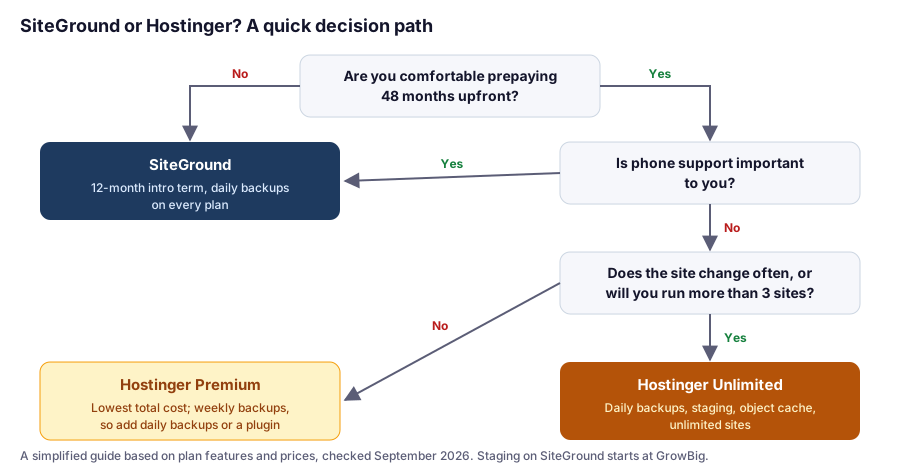
Pick: SiteGround GrowBig if you value 30 days of backup history, staging with Custom Deploy, and phone support. Hostinger Unlimited if long-term cost matters more and 7 days of daily backups is enough history for you.
The cost of that choice: GrowBig costs $779.64 over three years; Hostinger Unlimited costs $191.52 for four. You’re paying about $590 more for SiteGround’s three years than for Hostinger’s four, in exchange for longer backup history, selective deploys, and phone support. For some businesses that’s cheap insurance; for others it isn’t worth it.
Scenario 3: A Freelancer With Several Small Sites
Pick: Hostinger Unlimited, which allows unlimited sites with daily backups and staging, at $191.52 for four years.
Watch for: the PHP version setting applies to every site on the plan, and all sites share the account’s 60 PHP workers. Keep clients with heavier traffic, or sites stuck on old plugins, on their own plans.
The SiteGround alternative: GrowBig also allows unlimited sites, and GoGeek adds Git and white-label access for client work, at a higher long-term cost.
Switching Between Them
- Moving to SiteGround: there’s a free Migrator plugin, and your first professional migration is free.
- Moving to Hostinger: free automatic website migration is included.
- Either way: take a full backup first, test the site on the new host before changing DNS, and keep the old account for a week or two. Our migration guide covers the zero-downtime steps.
Still weighing other hosts? See our WordPress hosting comparison or SiteGround alternatives.
FAQ
Is Hostinger better than SiteGround?
It depends on how long you'll stay and what you value. Over six years, Hostinger Premium costs $407.28 versus $1,115.28 for SiteGround StartUp (prices checked September 2026). SiteGround offers daily backups on every plan with 30 days of history, phone support, and a smaller first-year bill.
Which is better for beginners, SiteGround or Hostinger?
For beginners who aren't sure they'll keep a site long term, SiteGround's 12-month intro term and daily backups are the safer start. For beginners confident they'll stay, Hostinger Unlimited offers daily backups and staging at a much lower long-term cost.
Which has better backups, SiteGround or Hostinger?
SiteGround keeps up to 30 daily backups on every plan, stored on a different server. Hostinger Premium includes weekly backups, while Unlimited and higher include daily backups kept for 7 days. SiteGround's longer history helps with problems you don't notice right away.
How do I check caching on SiteGround and Hostinger?
Open your site logged out and check the page's response headers. On SiteGround, look for x-proxy-cache: HIT. On Hostinger, look for x-litespeed-cache: hit.
Does changing PHP affect all my sites?
On Hostinger, yes: the PHP version applies to all websites on the hosting plan. SiteGround sets PHP per site in Site Tools under Devs, then PHP Manager, with optional Managed PHP updates.
Do SiteGround and Hostinger use cPanel?
No. SiteGround uses Site Tools and Hostinger uses hPanel. If you specifically want cPanel, consider ChemiCloud.
The Bottom Line
SiteGround costs more over time, but you get a smaller first bill, 30 days of daily backups on every plan, staging with selective deploys from GrowBig, and phone support. Hostinger costs dramatically less if you stay for years, and Unlimited closes most of the practical gaps with daily backups, staging, and object caching.
Decide based on two honest questions: how sure are you that you’ll keep this site for more than a year, and how much backup history and support is worth to you? Your answers point clearly to one or the other.