SiteGround Alternatives (2026): Better Fits by Reason

Some links on this page are affiliate links. If you buy through them, we may earn a commission at no extra cost to you. It never decides what we recommend —read how we make money.
SiteGround is our top pick for most WordPress beginners, and we still think that’s the right default. But no host fits everyone. The most common reasons people look elsewhere are specific: a renewal bill that’s higher than expected, wanting cPanel, needing more sites on a budget, or a site that’s outgrown shared hosting.
So instead of a generic “top 10,” this guide matches each reason to the alternative that actually solves it, works out what switching saves, and covers what changes on the technical side when you move a site away from SiteGround. All prices were checked on each provider’s website on September 15, 2026.
Quick Picks: The Best SiteGround Alternative for Your Reason
| Your reason for leaving | Best alternative | Why |
|---|---|---|
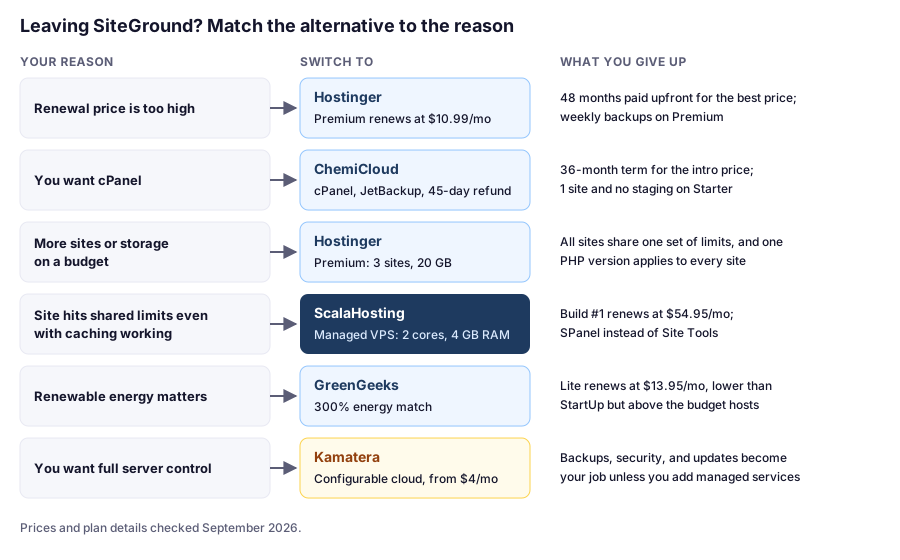
| Renewal price is too high | Hostinger | Premium renews at $10.99/mo vs. SiteGround StartUp’s $17.99/mo |
| You want cPanel | ChemiCloud | cPanel with JetBackup, daily backups, and a 45-day refund window |
| You need more sites on a budget | Hostinger | Premium: 3 sites and 20 GB, vs. StartUp’s 1 site and 10 GB |
| Your site has outgrown shared hosting | ScalaHosting | Managed cloud with reserved CPU and RAM |
| You want to pay with PayPal at checkout | Hostinger | Lists PayPal, Apple Pay, and Google Pay (region-dependent) |
| Renewable energy matters to you | GreenGeeks | Advertises a “300% Energy Match” |
| You’re a developer who wants full server control | Kamatera | Configurable cloud servers, hourly billing, 30-day free trial |
Prices checked September 2026.
Before You Leave: Is It the Plan or the Host?
Moving hosts takes an afternoon at best and a weekend at worst. Before you do it, make sure the new host would actually fix the problem.
If it’s the price: work out what the next three years cost where you are and where you’d go. The scenarios below do this for common plans. Intro prices usually apply to new customers only, so an alternative’s cheap first term is real money saved, but its renewal eventually arrives too.
If it’s speed: check that caching is working before blaming the host. Open your site logged out, open your browser’s developer tools, reload, and look at the x-proxy-cache header on the page request. HIT means SiteGround served the page from its cache. If you only ever see MISS or BYPASS on public pages, the fix is in the Speed Optimizer plugin’s settings, not a new host. Our SiteGround review explains each status.
If it’s resources: look at the numbers. SiteGround shows CPU seconds used per hour and per day in Client Area → Services → Hosting → Settings → Statistics. If you’re hitting the plan’s limit with caching working, compare a bigger plan with a VPS; our guide to shared hosting vs. VPS walks through how.
The Best SiteGround Alternatives
1. Hostinger: Lower Renewals and More on the Entry Plan
Hostinger solves SiteGround’s two most common complaints, renewal price and entry-plan limits, and adds flexible payment options. You trade SiteGround’s 12-month first commitment and 30 daily backups for a much lower long-term cost.
Best for
- Cutting long-term hosting costs
- Running up to 3 sites on an entry plan
- Paying with PayPal, Apple Pay, or Google Pay (where available)
Not for
- Anyone who doesn't want to prepay 48 months
- Anyone who wants many backup copies on the cheapest plan
Price: Premium $2.99/mo (48 months, $143.52 upfront), renews at $10.99/mo · Unlimited $3.99/mo, renews at $16.99/moPrices checked: September 2026
What you gain over SiteGround:
- Lower renewals: $10.99/mo (Premium) vs. $17.99/mo (StartUp); $16.99/mo (Unlimited) vs. $29.99/mo (GrowBig)
- A bigger entry plan: 3 websites and 20 GB of storage on Premium
- Published resource limits in CPU cores, RAM, and PHP workers, with a usage graph in hPanel
- Flexible payments: PayPal, Apple Pay, and Google Pay in many regions
What you give up:
- Backup depth. Premium has weekly backups. Unlimited has daily backups, kept for 7 days, versus SiteGround’s 30 daily copies.
- A short commitment. The best price requires 48 months upfront.
- Staging on the entry plan. Hostinger’s staging starts at Unlimited (which replaced the Business plan in July 2026).
Full details: Hostinger review and SiteGround vs Hostinger.
2. ChemiCloud: cPanel, Daily Backups, and a Longer Refund Window
ChemiCloud is the closest match for someone who likes SiteGround’s daily backups but wants cPanel and a lower renewal price. Migrations are free too. Full details in our ChemiCloud review.
Best for
- People who want cPanel
- Daily backups on the cheapest plan
- Buyers who want more time to decide (45-day refund)
Not for
- Anyone who wants multiple sites on the entry plan
- Buyers who don't want a 36-month term
Price: WordPress Starter $1.95/mo (36 months, $70.20 upfront), renews at $11.95/moPrices checked: September 2026
What you gain over SiteGround:
- cPanel, with Softaculous for installs and staging, JetBackup for restores, and phpMyAdmin
- Lower renewals: $11.95/mo (Starter) vs. $17.99/mo (StartUp)
- More storage on the entry plan: 20 GB NVMe vs. 10 GB
- A 45-day money-back guarantee vs. SiteGround’s 30 days
What you give up:
- A short commitment. The intro price requires a 36-month term.
- Backup depth on the entry plan: 10 daily backups kept on Starter, 20 on Pro, 30 on Turbo.
- Multiple sites and staging on the entry plan. Starter is 1 website with no staging; Pro ($2.95/mo, renews at $17.95/mo) adds both.
3. ScalaHosting: When You’ve Outgrown Shared Hosting
If you’re leaving SiteGround because your site needs more resources, not because of price, a managed VPS is the real upgrade. ScalaHosting reserves CPU and RAM for your server while still running it for you.
Best for
- Busy sites and stores hitting shared hosting limits
- Freelancers and agencies hosting several client sites
- Anyone who wants VPS resources without managing a server
Not for
- New or low-traffic sites
- Tight budgets
Price: Managed cloud Build #1 $29.95/mo (2 cores, 4 GB RAM, 50 GB NVMe), renews at $54.95/moPrices checked: September 2026
What you gain: reserved resources (2 to 12 CPU cores across its Build plans), the SPanel control panel with no cPanel license to pay for, a choice of web servers, and free website migration.
What you give up: a much higher price. Build #1 renews at $54.95/mo, compared with $29.99/mo for GrowBig and $44.99/mo for GoGeek. Only move here if your site genuinely needs it. See our ScalaHosting review.
4. GreenGeeks: If Renewable Energy Is a Priority
GreenGeeks’ reason to exist is its environmental commitment, advertised as a “300% Energy Match.” Its renewal prices are lower than SiteGround’s, though higher than Hostinger’s or ChemiCloud’s.
Best for
- Site owners who want hosting matched with renewable energy
- A low first-year payment with only a 12-month commitment
Not for
- Anyone switching mainly to save money long term
Price: Lite $2.95/mo prepaid for 12 months, renews at $13.95/moPrices checked: September 2026
What you gain: a renewable energy commitment, a 12-month intro term like SiteGround’s, a lower renewal than StartUp ($13.95 vs. $17.99/mo), 25 GB of storage on Lite, unmetered traffic, and daily backups.
What you give up: GreenGeeks doesn’t stand out on price or features beyond its green positioning. Over four years, Lite costs $537.60, less than SiteGround StartUp’s $683.52 but well above the budget leaders.
5. UltaHost: Budget Plans With Published Traffic Estimates
UltaHost publishes an estimated monthly visit count for each plan and offers a VPS WordPress tier for growth. Its headline price comes with a refund catch.
Best for
- Small sites that fit within published visit estimates
- Buyers who want a VPS WordPress tier with the same provider
Not for
- Anyone who wants the headline price and a refund window
- Anyone who needs several email accounts on the entry plan
Price: Ulta WordPress $3.22/mo on a 24-month term ($77.28 upfront)Prices checked: September 2026
What you gain: a low price, 30 GB of storage on the entry plan, visit estimates to guide your choice (about 10,000/month on Ulta WordPress, per UltaHost), daily backups, and a VPS WordPress plan to grow into.
What you give up: a refund window on the cheapest price (UltaHost’s policy excludes 24- and 36-month plans), the entry plan’s 1 email account and 2 databases, and certainty about renewal terms until you check at checkout. See our UltaHost review.
6. Kamatera: For Developers Who Want Full Control
Kamatera is a different kind of product: configurable cloud servers, not managed WordPress hosting. It’s an alternative to SiteGround only if you want to run the server yourself.
Best for
- Developers comfortable managing Linux servers
- Custom stacks, testing, and short-lived servers
Not for
- Anyone who wants managed WordPress hosting
Price: Cloud servers from $4/mo (1 vCPU, 1 GB RAM, 20 GB NVMe), hourly billing availablePrices checked: September 2026
What you gain: full control, no long-term contracts, hourly billing, 9 US and many European locations, and a 30-day free trial worth up to $100 on one server.
What you give up: everything SiteGround manages for you, including backups, caching, security, and server updates, unless you add Kamatera’s optional managed services. See managed vs. shared hosting for the full list.
Is Switching Worth It? Three Cases, With the Math
These compare the next three years of staying with what the same period costs as a new customer elsewhere, using prices verified in September 2026. The sites are illustrative examples.
A Single Blog Facing Its First StartUp Renewal
| Option | Next 3 years | Backups |
|---|---|---|
| Stay on SiteGround StartUp | 3 × $215.88 = $647.64 | Daily, 30 copies |
| Hostinger Premium | $143.52 (covers 4 years) | Weekly |
| Hostinger Unlimited | $191.52 (covers 4 years) | Daily, kept 7 days |
| ChemiCloud Starter | $70.20 | Daily, 10 kept |
The verdict: switching saves roughly $450–$580 over three years. For a hobby blog, that’s hard to argue with; I’d pick Hostinger Unlimited or ChemiCloud Starter to keep daily backups. For a site that earns money, the question is whether 30 daily copies and a one-year commitment are worth about $13–$16 a month to you.
Six Small Sites on GrowBig
| Option | Next 3 years | Staging |
|---|---|---|
| Stay on SiteGround GrowBig | 3 × $359.88 = $1,079.64 | Yes |
| Hostinger Unlimited | $191.52 (covers 4 years) | Yes |
| ChemiCloud WordPress Pro | 36 × $2.95 = $106.20 | Yes |
The verdict: the saving is large, about $890–$975 over three years, and both alternatives include staging. The cost is time: six migrations, six DNS changes, and checking each site afterward. All six sites will also share one account’s limits, just as they do on GrowBig.
A Store Running Out of CPU on GrowBig
If the problem is resources rather than price, staying can be competitive. Moving up to GoGeek doubles the CPU seconds limit (2,000 to 4,000 per hour) for $15/mo more at renewal. ScalaHosting Build #1 is $24.96/mo more than GrowBig at renewal, for reserved cores and RAM. Neither is automatically right: GoGeek is the smaller change; the VPS has more room to grow. Our shared hosting vs. VPS guide covers how to decide.
What Changes When You Move a Site Off SiteGround
This is the part most “alternatives” lists skip. A few SiteGround-specific pieces don’t come with you:
| On SiteGround | What happens when you move | What to do |
|---|---|---|
| Site Tools dashboard | Replaced by the new host’s panel (hPanel, cPanel, or SPanel) | Note your DNS records, email accounts, and cron jobs before you leave |
| Speed Optimizer plugin | Still installs elsewhere, but Dynamic Caching, Memcached, and image compression only work on SiteGround’s servers | Replace page caching with the new host’s recommended tool, such as LiteSpeed Cache on LiteSpeed hosts |
| SiteGround’s daily backups | Stay with the SiteGround account and stop when it’s closed | Download a full backup before canceling |
| Email on SiteGround | Site migration tools move WordPress, not mailboxes | Recreate mailboxes on the new host, or move email to a separate provider, before changing DNS |
| Staging copies | Not migrated | Push or discard staging changes first |
Speed Optimizer details from its WordPress.org listing, checked September 2026.
Side-by-Side: SiteGround vs. the Alternatives
| SiteGround StartUp | Hostinger Premium | ChemiCloud Starter | GreenGeeks Lite | UltaHost Ulta WordPress | |
|---|---|---|---|---|---|
| Intro price | $2.99/mo | $2.99/mo | $1.95/mo | $2.95/mo | $3.22/mo |
| Term for intro | 12 months | 48 months | 36 months | 12 months | 24 months |
| Renews at | $17.99/mo | $10.99/mo | $11.95/mo | $13.95/mo | See note* |
| Websites | 1 | 3 | 1 | 1 | 1 |
| Storage | 10 GB | 20 GB | 20 GB NVMe | 25 GB | 30 GB NVMe |
| Automatic backups | Daily (30 kept) | Weekly | Daily (10 kept) | Daily | Daily |
| Control panel | Site Tools | hPanel | cPanel | — | — |
| Money-back | 30 days | 30 days | 45 days | 30 days | Monthly/annual only; not 24-mo plans |
Prices checked September 2026. *UltaHost shows two renewal figures for this plan: $3.22/mo “for 2 years” and a regular price of $5.51/mo; confirm at checkout. “—” means the provider doesn’t list this detail.
When You Should Stay With SiteGround
Switching isn’t always the answer. SiteGround is still the better choice if you value:
- Daily backups with 30 copies on every plan, including the cheapest
- Staging from GrowBig, with Git on GoGeek
- A 12-month intro term instead of prepaying three or four years
- A strong server-level security baseline: a web application firewall, AI bot protection, and managed WordPress updates
If renewal price is the only issue, compare your total cost over the next few years before moving. Sometimes the right move is simply a different plan. Our SiteGround review breaks down what each plan includes.
How to Switch Away From SiteGround Safely
- Check your renewal date in SiteGround’s Client Area, so you can move before you’re billed for another term.
- Take a fresh backup and download a copy. Here’s how backups work on SiteGround.
- Write down what lives outside WordPress: DNS records, email accounts, cron jobs, and any redirects set in Site Tools.
- Sign up with the new host and use its migration option. Hostinger, ChemiCloud, and ScalaHosting all list free migration.
- Swap caching plugins as described above, and test the site on the new host before changing DNS.
- Set up email on the new host first, then point your domain. Read how to avoid breaking business email when changing DNS before you do.
- Keep SiteGround active for a week or two as a safety net, then cancel.
Our migration guide is written for moving to SiteGround, but the checks for a clean, zero-downtime switch apply in either direction.
FAQ
What is the best alternative to SiteGround?
It depends on why you're leaving. For lower renewal prices, Hostinger. For cPanel and a 45-day refund window, ChemiCloud. For more resources without managing a server, ScalaHosting's managed cloud. For renewable energy, GreenGeeks.
Is there a cheaper alternative to SiteGround?
Yes. Hostinger Premium renews at $10.99/mo and costs $143.52 for its 48-month term, compared with $17.99/mo and $683.52 over four years for SiteGround StartUp. ChemiCloud Starter renews at $11.95/mo (all checked September 2026).
Which SiteGround alternative has cPanel?
ChemiCloud uses cPanel, with Softaculous for installs and staging, JetBackup for restores, and phpMyAdmin. SiteGround and Hostinger both use their own dashboards instead.
Is Hostinger better than SiteGround?
Hostinger is much cheaper over time and has a bigger entry plan. SiteGround keeps 30 daily backups on every plan and doesn't require a four-year upfront term for its best price. See our SiteGround vs Hostinger comparison for details.
Does the SiteGround Speed Optimizer plugin work on other hosts?
It installs and some features work, such as file-based caching and frontend optimizations, but Dynamic Caching, Memcached, and image compression only work on SiteGround's servers. After moving, switch to your new host's recommended caching tool and deactivate Speed Optimizer first.
How do I move my site away from SiteGround?
Take a fresh backup, note DNS records and email accounts, sign up with your new host, and use its migration option (Hostinger, ChemiCloud, and ScalaHosting list free migration). Swap caching plugins, test the site, set up email, update DNS, and keep your SiteGround account active for a week or two before canceling.
Should I leave SiteGround because of the renewal price?
Compare your total cost over the next few years first. For a single hobby site, switching can save several hundred dollars over three years. If you rely on SiteGround's 30 daily backups or staging, check which plan elsewhere includes them before you decide.
The Bottom Line
Leaving SiteGround makes sense when you know what you’re solving. For price, choose Hostinger, ideally the Unlimited plan for daily backups and staging. For cPanel, choose ChemiCloud. For more resources, choose ScalaHosting. For renewable energy, choose GreenGeeks. And if what you value is SiteGround’s backups, staging, and short commitment, it may be worth staying and picking the plan that fits.
For every host we cover, see our WordPress hosting comparison.