UltaHost Review (2026): Cheap WordPress & VPS Hosting, Real Terms

Some links on this page are affiliate links. If you buy through them, we may earn a commission at no extra cost to you. It never decides what we recommend —read how we make money.
UltaHost’s pricing gets attention: WordPress hosting from $3.22/mo and managed VPS plans from $5.52/mo. It also does two things that make choosing easier than at many hosts. It publishes estimated monthly visits for each WordPress plan, and it includes server management on every VPS.
But UltaHost’s fine print matters more than most. The billing term you pick decides whether you can get a refund at all. This review starts there, then covers how to size a plan, what “managed” VPS actually covers, how to check that caching works, and which plan fits four common situations.
UltaHost offers low prices, published visit estimates, daily WordPress backups, LiteSpeed hosting, managed VPS plans, and 31 data center locations. The key catch: the prices it advertises most prominently are on 24-month terms, which its refund policy doesn’t cover. Choose a shorter term if you want room to change your mind. For most WordPress sites, WordPress Starter is the plan to pick.
Best for
- Budget buyers who want to size a plan by estimated traffic
- People who want many sites or lots of storage cheaply (WordPress Starter: 100 sites, 100 GB)
- Developers who want a low-cost VPS with management included
Not for
- Anyone who wants the lowest advertised price *and* a refund window
- Sites that need several email accounts on the entry plan
- People who want phone support
Price: Ulta WordPress $3.22/mo on a 24-month term · VPS Basic $5.52/mo on a 24-month termPrices checked: September 2026
How We Evaluated UltaHost
I look at the things that decide what a plan is really like to live with: the billing term behind the headline price, what the refund policy covers, resource and fair-use limits, caching, and backups. That focus comes from my background as a front-end developer since 2016, including custom WordPress and theme development.
Prices, plan specifications, and policies here were checked in September 2026.
Start Here: Your Billing Term Decides Your Refund Rights
At most hosts, the refund window works the same no matter which term you choose. At UltaHost, it doesn’t:
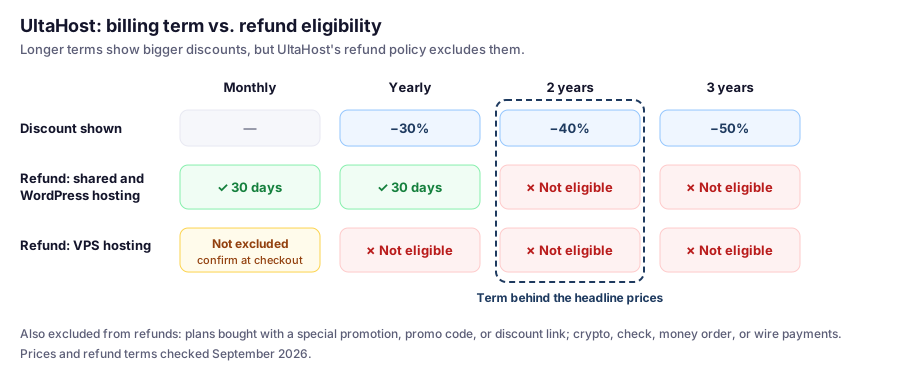
UltaHost’s refund policy (checked September 2026):
- Shared and WordPress hosting: monthly and annual plans are eligible for a full refund within 30 days. Biennial and triennial plans are not eligible.
- VPS hosting: refunds aren’t available when canceling a yearly, biennial, or triennial plan.
- Promotions: plans purchased using a special promotion, promo code, or special discount link are non-refundable.
- Payment methods: purchases made with cryptocurrency or other digital assets, checks, money orders, or bank wire transfers aren’t refunded.
- Also excluded: control panel licenses, domain registration fees, and SSL certificates. A $16.99 domain fee is deducted if a free domain was included.
- Eligibility: only the first package purchased, for billing accounts less than 30 days old.
WordPress Hosting Plans: Choose by Estimated Visits
UltaHost publishes an estimated number of monthly visits for each WordPress plan, which makes sizing much easier:
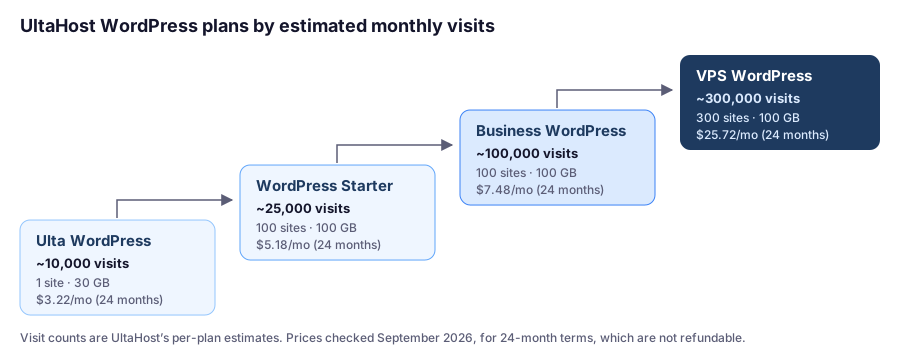
| Plan | Price (24-month term) | 24 months total | Listed regular price | Websites | Storage | Est. monthly visits |
|---|---|---|---|---|---|---|
| Ulta WordPress | $3.22/mo | $77.28 | $5.51/mo | 1 | 30 GB NVMe | ~10,000 |
| WordPress Starter | $5.18/mo | $124.32 | $8.68/mo | 100 | 100 GB NVMe | ~25,000 |
| Business WordPress | $7.48/mo | $179.52 | $12.43/mo | 100 | 100 GB NVMe | ~100,000 |
| VPS WordPress | $25.72/mo | $617.28 | $45.47/mo | 300 | 100 GB NVMe | ~300,000 |
Prices checked September 2026. There are also monthly, yearly (−30%), and 3-year (−50%) billing options, with the final price set at checkout.
Renewal wording: each plan card shows two different numbers — it “renews at” the 24-month price “for 2 years” (for example, “Renews at $5.18/mo for 2 years” on WordPress Starter) and also lists a higher regular price. Confirm at checkout what you’ll actually pay when the term ends.
How to Read the Visit Estimates
As a developer, I find published estimates genuinely useful, but treat them as planning figures, not guarantees:
- They assume typical pages. A lean site with good caching can handle more; a heavy page builder site with large images and many plugins can handle less.
- Cacheable traffic is cheap; uncached traffic isn’t. Anonymous blog readers mostly hit the cache. Logged-in members, WooCommerce carts, and checkouts make the server run PHP for every request.
- Leave headroom. If your current traffic is near a plan’s estimate, choose the next plan up rather than running at the edge from day one.
What’s Included on WordPress Plans
What the WordPress plans include:
- LiteSpeed hosting, with what UltaHost calls “advanced caches”
- Daily automated backups
- Free migration, free SSL, and free DDoS protection
- A free WordPress manager and WP-CLI access
- Unlimited bandwidth, subject to UltaHost’s fair usage policy
- A CDN add-on, not included by default
Entry plan limits: Ulta WordPress includes 1 email account and 2 databases. WordPress Starter and up list free emails and unlimited databases.
Checking That LiteSpeed Caching Works
UltaHost’s WordPress hosting runs on LiteSpeed, so you can use LiteSpeed’s documented check. It works once you’re using the LiteSpeed Cache plugin:
- Open your site in a private window so you’re logged out.
- Open DevTools › Network, reload, and click the page request.
- Look for
x-litespeed-cache:hitmeans the page came from cache;missmeans it didn’t this time.
curl -sI https://yourdomain.com/ | grep -i x-litespeed-cacheIf you always see miss, something is wrong with the cache setup. If the header never appears, page caching isn’t active.
Why this matters on budget plans: plan capacity depends heavily on how much traffic the cache absorbs. Confirming hit on your main pages is the cheapest performance upgrade you’ll ever make.
Resource Usage and Fair Usage
UltaHost doesn’t publish per-plan CPU, RAM, or inode numbers for its WordPress plans the way some hosts do. What it does publish:
- Fair usage policy: if bandwidth use consistently exceeds 3–5× the average of similar plans, or causes performance problems for other users, UltaHost can send a warning and ask you to optimize or upgrade. The policy also allows it to throttle bandwidth temporarily, suspend the account pending review, or end the service for repeated or deliberate violations.
- Excessive CPU, RAM, or disk I/O that affects other users is prohibited, without numeric caps stated.
How to find what’s using resources: UltaHost’s knowledge base guide for cPanel accounts points to Resource Usage under the Metrics section. It covers reviewing CPU, memory, inodes, and I/O over a time range, the Snapshots tab for processes using the most resources, and the Database Queries and HTTP Queries tabs for slow queries and heavy traffic.
VPS Hosting: What “Managed” Includes
The VPS plans are sold as managed servers:
| Plan | Price (24-month term) | Regular price | CPU | RAM | NVMe storage |
|---|---|---|---|---|---|
| VPS Basic | $5.52/mo | $9.19/mo | 1 core | 1 GB DDR5 | 30 GB |
| VPS Business | $9.78/mo | $16.10/mo | 2 cores | 2 GB DDR5 | 50 GB |
| VPS Professional | $15.87/mo | $26.22/mo | 3 cores | 4 GB DDR5 | 75 GB |
| VPS Enterprise | $20.69/mo | $34.49/mo | 4 cores | 6 GB DDR5 | 100 GB |
Prices checked September 2026.
What the management covers: “free monthly management” — UltaHost’s technical team handles installation, configuration, updates, and monitoring, 24 hours a day.
Also listed on VPS plans: free weekly backups, with full backups and instant snapshots you can create anytime from your admin panel; free DDoS protection; free SSL; and free migrations.
Control panels: there are free panels (Hestia and CyberPanel) and paid panels (cPanel, Plesk, ispmanager, and aaPanel). Control panel licenses are non-refundable, so check what a paid panel costs before choosing one.
My sizing advice for WordPress: 1 GB of RAM is tight for a web server, PHP, and a database together. Start at VPS Business (2 GB), or VPS Professional (4 GB) for a store or several sites.
For when a VPS makes sense at all, see shared hosting vs. VPS.
Which Plan Fits? Four Real-World Scenarios
These scenarios use UltaHost’s published prices, estimates, and policies. The site types are illustrative examples.
Scenario 1: A First Site, and You Want a Safety Net
The site: a new blog or small business site that you’re not yet sure about.
Plan: WordPress Starter on a yearly term. You give up the deeper 24-month discount, but yearly WordPress plans are eligible for the 30-day refund.
Why not the 24-month price? If the site or host doesn’t work out in the first month, a 24-month plan isn’t refundable under UltaHost’s policy. Paying a little more for the first year buys you that option.
Scenario 2: A Freelancer With Many Small Sites
The situation: fifteen low-traffic brochure sites for clients.
Plan: WordPress Starter, which allows up to 100 sites and 100 GB, for $124.32 over 24 months.
The catch: UltaHost shows its visit estimate (~25,000) per plan, not per site, so plan on fifteen sites sharing it, along with the account’s resources. Keep any client with real traffic on its own plan, and check Resource Usage after adding each new site.
Scenario 3: A Growing Content Site
The site: a blog approaching 25,000 monthly visits, with a newsletter and some logged-in members.
Plan: Business WordPress (~100,000 visits) for $179.52 over 24 months, which gives plenty of headroom above current traffic.
Do this first: confirm x-litespeed-cache: hit on your main pages. Members-only content and logged-in traffic bypass page caching, so that’s where capacity goes.
Next step up: VPS WordPress (~300,000 visits) at $25.72/mo on a 24-month term.
Scenario 4: A Developer Who Wants a Cheap Managed VPS
The situation: you want your own server for a WordPress site plus a couple of small apps, without doing all the maintenance.
Plan: VPS Professional (3 cores, 4 GB RAM, 75 GB) at $15.87/mo on a 24-month term, with a free panel like Hestia or CyberPanel to avoid license costs.
Before committing to 24 months: remember that yearly and longer VPS terms aren’t refundable. If you’re unsure, start on a monthly term to test your stack, and decide on a longer term only once you’re confident.
Buying Details
- Support: 24/7 live chat, tickets (critical issues answered in under 30 minutes), and email, in more than ten languages. There’s no phone number.
- Data centers: 31 locations in 25 countries, including Seattle, Dallas, Los Angeles, New York, and Chicago in the US, and London, Madrid, Frankfurt, Zurich, Amsterdam, Paris, Milan, Oslo, Stockholm, and Warsaw in Europe.
- Control panel on shared hosting: cPanel, with separate instructions for the WordPress hosting plans.
UltaHost Pros and Cons
Pros
- Low prices on WordPress and VPS plans
- Published monthly visit estimates for each WordPress plan
- WordPress Starter: 100 sites and 100 GB at a budget price
- LiteSpeed hosting with daily WordPress backups
- Management included on every VPS plan
- 31 data center locations, including 5 US cities and 10 in Europe
- Free DDoS protection and migrations
Cons
- 2- and 3-year shared and WordPress plans aren't refundable
- Yearly and longer VPS plans aren't refundable
- No published CPU, RAM, or inode numbers for WordPress plans
- Entry WordPress plan: 1 email account and 2 databases
- Weekly backups on VPS plans
- CDN is an add-on; no phone support
How UltaHost Compares
For other budget options with longer refund windows, see our cheap WordPress hosting comparison. For VPS options, see best VPS hosting for WordPress, and for every host we cover, our WordPress hosting comparison.
FAQ
Is UltaHost good for WordPress?
It's a solid budget option. UltaHost's WordPress plans list LiteSpeed hosting, daily automated backups, free migration, SSL, and DDoS protection, and they publish estimated monthly visits to help you size a plan. Choose your billing term carefully, because it affects refunds.
Does UltaHost have a money-back guarantee?
Yes, with conditions. Its refund policy allows 30-day refunds on monthly and annual shared and WordPress plans, but not on biennial or triennial plans. VPS plans aren't refundable on yearly or longer terms, and plans bought through special promotions or discount links are non-refundable (checked September 2026).
Which UltaHost billing term should I choose?
If you want refund protection, choose monthly or yearly for WordPress hosting, or monthly for VPS. The 24-month prices are lower, but UltaHost's refund policy excludes those terms.
How many visitors can UltaHost handle?
UltaHost estimates about 10,000 monthly visits for Ulta WordPress, 25,000 for WordPress Starter, 100,000 for Business WordPress, and 300,000 for VPS WordPress (checked September 2026). Real capacity depends on page weight and how much traffic is served from cache.
What does UltaHost's managed VPS include?
UltaHost's team handles installation, configuration, updates, and monitoring 24 hours a day at no extra charge. VPS plans also include free weekly backups, on-demand snapshots, DDoS protection, SSL, and migrations.
How do I check if caching works on UltaHost?
With the LiteSpeed Cache plugin active, open your site logged out, check the page's response headers in DevTools, and look for x-litespeed-cache. A value of hit means the page came from cache.
Does UltaHost have phone support?
No. Support is 24/7 live chat, tickets, and email, in more than ten languages.
Final Verdict
UltaHost offers a lot for the money: published visit estimates that make sizing straightforward, generous storage and site counts from WordPress Starter up, LiteSpeed hosting with daily backups, and management included on every VPS. Its wide choice of data centers is a real bonus for sites with audiences concentrated in one region.
The deciding factor is the fine print. The best prices come with 24-month terms that UltaHost’s policy doesn’t refund. If you’re confident, WordPress Starter on a longer term is excellent value. If you’re not, pay a little more for a monthly or yearly term, and keep the option to walk away.