Best SEO Plugins for WordPress (2026): Free & Paid Compared
Some links on this page are affiliate links. If you buy through them, we may earn a commission at no extra cost to you. It never decides what we recommend —read how we make money.
Every WordPress site needs an SEO plugin, and there are more good ones than ever. The honest truth most “best SEO plugin” lists skip is that the plugin won’t rank your site. It handles the technical basics so search engines can understand your pages. Your content does the ranking.
That changes how you should choose. Pick a plugin that covers the essentials cleanly, fits how you like to work, and doesn’t push you into a subscription you don’t need. This guide compares six popular options on exactly that.
Quick Picks
| Plugin | Best for | Premium from |
|---|---|---|
| Yoast SEO | Beginners who want writing guidance while they work | $118.80/year (ex. VAT) |
| Rank Math | Getting the most features in the free version | €95.88/year intro (shown in EUR to us) |
| All in One SEO (AIOSEO) | A guided setup and an all-in-one feature set | $49.50 first year, normally $99/year |
| SEOPress | Clean, white-label SEO with no ads in the admin | $49/year (1 site) |
| The SEO Framework | Lightweight, automated SEO with no ads or tracking | Free core; extensions from $7/month billed yearly |
| Slim SEO | A minimal, set-and-forget plugin | Free; Pro from $59/year |
Prices and details checked on each plugin’s website and WordPress.org listing on September 15, 2026. Prices may display in your local currency.
Our short answer: most sites are well served by a free plugin. Choose Rank Math or Yoast SEO if you want guidance and lots of options, or The SEO Framework or Slim SEO if you’d rather have something lighter that mostly runs itself.
What an SEO Plugin Actually Does
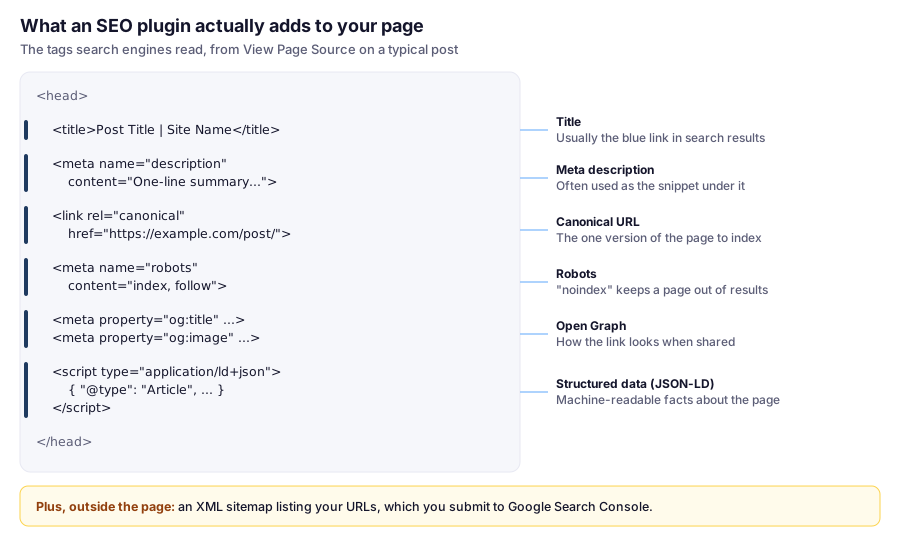
It’s worth knowing what you’re choosing between. The core jobs are the same across all six:
- Titles and meta descriptions: what appears in search results for each page
- XML sitemaps: a list of your pages that helps search engines discover them
- Canonical URLs: telling search engines the main version of a page, which prevents duplicate-content confusion
- Indexing controls (meta robots): keeping thin pages, like tag archives or thank-you pages, out of search results
- Structured data (schema): machine-readable details that can help search engines understand your content
- Social previews: how your pages look when shared (Open Graph and similar tags)
Beyond these, plugins differ in extras: content analysis, redirects, 404 monitoring, internal link suggestions, AI tools, and local SEO.
Check What Your Plugin Actually Outputs
Settings screens matter less than what ends up in your page’s source code, because that’s all a search engine sees. Two ways to check:
In the browser: open a post, right-click, choose View Page Source, and search for <title>, description, canonical, robots, and application/ld+json.
From a terminal (macOS, Linux, or curl.exe in Windows PowerShell), with one of your own URLs:
curl -s https://yourdomain.com/sample-post/ | grep -iE '<title>|name="description"|rel="canonical"|name="robots"|ld\+json'What to look for:
- Exactly one title, description, and canonical tag. Two of any usually means two plugins, or a theme and a plugin, are both writing them.
- A canonical URL that matches the page, including
httpsand the trailing slash your site uses. - No
noindexon pages you want in search results. If every page saysnoindex, check Settings → Reading → Search engine visibility in WordPress. That “Discourage search engines” box is easy to leave ticked after building a site. - A working sitemap. Yoast and Rank Math serve theirs at
/sitemap_index.xml; WordPress’s built-in sitemap is at/wp-sitemap.xml. Other plugins show the exact URL in their sitemap settings. Open it in a browser and make sure your important pages are listed.
How We Compared
Installs, ratings, features, and prices in this comparison were checked in September 2026.
The analysis comes from my background as a front-end developer since 2016, including custom WordPress and theme development, which means paying attention to what a plugin outputs and how much it adds to a site.
At a Glance: WordPress.org Data
| Plugin | Active installations | Rating | Requires |
|---|---|---|---|
| Yoast SEO | 10+ million | 4.8 (27,819 ratings) | WP 6.9, PHP 7.4 |
| Rank Math | 4+ million | 4.8 (7,503 ratings) | WP 6.7, PHP 7.4 |
| All in One SEO | 2+ million | 4.7 (5,205 ratings) | WP 5.7, PHP 7.2 |
| SEOPress | 300,000+ | 4.8 (1,255 ratings) | WP 6.5, PHP 7.4 |
| The SEO Framework | 200,000+ | 4.9 (378 ratings) | WP 6.0, PHP 7.4 |
| Slim SEO | 70,000+ | 4.7 (136 ratings) | WP 6.6, PHP 7.4 |
Plugin data checked September 2026.
Note Yoast SEO’s minimum requirement of WordPress 6.9. If you’re running an older WordPress version, update WordPress first, which you should do anyway.
The Best SEO Plugins for WordPress
1. Yoast SEO: Best for Writing Guidance
Free features listed on WordPress.org include real-time SEO and readability analysis with a traffic-light system, schema structured data, XML sitemaps, canonical URLs, SERP previews for desktop and mobile, breadcrumbs, FAQ and HowTo blocks with built-in schema, and integrations with Google Site Kit, Semrush, Wincher, and Elementor.
Premium: Yoast SEO Premium lists $118.80/year (excluding VAT). It adds AI-generated titles and meta descriptions, internal linking suggestions, redirect automation, access to Yoast SEO Academy, and 24/7 support. Yoast also lists Local SEO, News SEO, Video SEO, and a Google Docs add-on as part of the package.
Best for: beginners and writers who like being nudged while they write. The readability analysis is useful if you’re new to writing for the web.
Keep in mind:
- The traffic-light scores are guidance, not rules. Don’t contort natural writing to turn every light green.
- Yoast lists redirect automation as a Premium feature, while several free plugins here list redirects in their free versions.
2. Rank Math: Most Features in the Free Version
Free features listed on WordPress.org include a setup wizard, 16+ schema types, unlimited focus keywords, Google Search Console and Analytics integration, content analysis, XML sitemaps, a built-in 404 monitor and redirection manager, internal link suggestions, automatic image alt text and title tags, role-based access, and Multisite support.
Premium: Rank Math’s pricing page showed PRO at €7.99/month billed annually (€95.88/year), renewing at €8.99/month, for unlimited personal websites. Business and Agency plans cover client sites. Prices were shown to us in euros; you may see your local currency.
Best for: people who want redirects, 404 monitoring, and extensive schema options without paying.
Keep in mind:
- More features means more settings to review. Take time with the setup wizard, and turn off modules you don’t need.
- PRO renews at a higher rate than the intro price.
3. All in One SEO (AIOSEO): Best Guided All-in-One Option
Free features listed on WordPress.org include a setup wizard, TruSEO on-page analysis, XML sitemaps, schema markup, Google Search Console integration, automatic image alt text and titles, breadcrumbs with JSON-LD, a robots.txt editor, canonical URL management, and social media previews. AIOSEO also emphasizes AI-powered tools across its features.
Premium: AIOSEO’s pricing page showed Basic at $49.50 for the first year (normally $99/year) for 1 site, with Plus (3 sites), Pro (10 sites), and Elite (100 sites) tiers. The first-year prices reflected a 50% off promotion.
Best for: beginners who want a guided setup and plan to use premium features.
Keep in mind:
- The advertised price is a first-year discount. Budget for the regular price, which is double, at renewal.
- It supports older setups (WordPress 5.7, PHP 7.2), but you should still keep WordPress and PHP current.
4. SEOPress: Best for a Clean, White-Label Setup
Free features listed on WordPress.org include an SEO metabox that works with the block editor and page builders like Elementor, Divi, and Bricks; content analysis with unlimited target keywords; Google SERP previews; social previews; XML and HTML sitemaps; image SEO; canonical URLs and meta robots controls; post-level redirections; and one-click migration from other SEO plugins. SEOPress is fully white label, with no tracking footprint.
Premium: SEOPress PRO starts at $49/year for 1 site.
Best for: freelancers and agencies building client sites, and anyone who wants a straightforward SEO plugin without promotional clutter in the dashboard.
Keep in mind: its free version doesn’t list schema among its features, so check the Free vs PRO comparison on SEOPress’s site if structured data matters to you.
5. The SEO Framework: Best Lightweight, Automated Option
What it offers: automated title and description generation, breadcrumb structured data, XML sitemaps, Open Graph and Twitter Card support, canonical URLs, and accessibility features, including full keyboard navigation and screen-reader compatibility. On WordPress.org, its developers describe it as free, ad-free, and without tracking or cookies, and claim it’s “the fastest” feature-complete SEO plugin.
Paid options: there’s no premium version of the core plugin. Paid extension plans start at $7/month billed yearly for 2 sites (Pro), with Business (20 sites) and Agency (200 sites) plans.
Best for: developers and site owners who want sensible automatic defaults, no upsells in the admin, and minimal configuration.
Keep in mind:
- It deliberately doesn’t do the “score your content” approach. If you want writing guidance, pick Yoast or Rank Math.
- When we checked, its WordPress.org listing showed the last update as about nine months earlier. That isn’t necessarily a problem for a mature plugin, but check the current update history before installing.
6. Slim SEO: Best Minimal, Set-and-Forget Plugin
Free features listed on WordPress.org include automatic meta tags (title, description, robots, Open Graph, Twitter Card, LinkedIn), XML sitemaps, breadcrumbs, JSON-LD schema, redirection rules and 404 monitoring, Google Analytics and code injection, RSS feed scraping prevention, import from other SEO plugins, and optional AI meta tag generation. The focus throughout is on staying small and automatic.
Premium: Slim SEO Pro lists $59/year for 1 website, $119/year for 10, and $179/year for unlimited, with a 14-day refund policy. Pro adds a visual schema builder, link suggestions and health monitoring, broken link repair, Search Console integration, and a writing assistant.
Best for: people who want SEO basics handled automatically with very few settings.
Keep in mind: fewer settings is the point, so power users who want granular control per page may prefer Rank Math or SEOPress.
Side-by-Side Feature Comparison
| Feature (free version) | Yoast | Rank Math | AIOSEO | SEOPress | TSF | Slim SEO |
|---|---|---|---|---|---|---|
| XML sitemaps | ✓ | ✓ | ✓ | ✓ | ✓ | ✓ |
| Schema / structured data | ✓ | ✓ (16+ types) | ✓ | — | Breadcrumbs | ✓ |
| Content analysis | ✓ | ✓ | ✓ | ✓ | — | — |
| Redirects | Premium | ✓ | — | ✓ (post level) | — | ✓ |
| 404 monitor | — | ✓ | — | — | — | ✓ |
| Import from other SEO plugins | — | — | — | ✓ | — | ✓ |
| Premium from | $118.80/yr | €95.88/yr intro | $49.50 1st yr | $49/yr | $7/mo (yearly) | $59/yr |
Based on features listed on each plugin’s WordPress.org page and pricing page, checked September 2026. “—” means the feature isn’t part of the free version. Check the plugin’s documentation if a feature matters to you.
“Lightweight” SEO Plugins: What That Really Means
If you care about speed, The SEO Framework and Slim SEO are the two that sell themselves on being lightweight. Here’s what that’s worth in practice:
- Fewer features usually means less code running and fewer settings screens, but every plugin on this list does the core job.
- What reaches the visitor matters most. Much of an SEO plugin’s front-end output is tags in your page’s
<head>. Check exactly what yours adds, including any scripts or stylesheets, with the View Page Source trick above. - Your theme, images, and page builder affect speed far more than your choice among these SEO plugins. A lean theme like GeneratePress and good hosting make a bigger difference.
So pick a lightweight SEO plugin because you like fewer settings and less admin clutter, not because you expect a dramatic speed gain.
Free or Premium: Do You Need to Pay?
Most sites don’t. Every plugin here covers titles, descriptions, sitemaps, canonicals, and indexing controls for free.
Consider premium when you have a specific need:
- Redirects in Yoast. Or switch to a free plugin that includes them.
- Advanced schema for specific content types
- Local SEO for a business with physical locations
- Internal linking suggestions on a large content site
- Client-site licensing for agencies
Remember that premium SEO plugins are yearly subscriptions, and several advertise a first-year price. Here’s what the entry premium plan for one site costs over three years at the prices we saw:
| Premium plan (1 site) | Year 1 | Years 2 and 3 (each) | 3-year total |
|---|---|---|---|
| SEOPress PRO | $49 | $49 | $147 |
| Slim SEO Pro | $59 | $59 | $177 |
| AIOSEO Basic | $49.50 | $99 | $247.50 |
| The SEO Framework Pro (2 sites) | $84 | $84 | $252 |
| Rank Math PRO (unlimited personal sites) | €95.88 | €107.88 | €311.64 |
| Yoast SEO Premium | $118.80 | $118.80 | $356.40 |
Prices checked September 2026, assuming renewals at the regular price. Yoast excludes VAT, and Rank Math may display prices in euros.
For comparison, Hostinger Premium hosting costs $143.52 for four years. A premium SEO plugin can easily cost more than budget hosting, which is one more reason to start free. See how much a website really costs.
Four Situations
These examples use prices checked September 2026.
A Personal Blog
Pick: a free plugin. Rank Math if you like options and want redirects built in, Slim SEO or The SEO Framework if you want to set it once and forget it. Cost: $0. Spend the setup time on title templates and noindexing thin archives instead.
A Beginner Writing Their First 50 Posts
Pick: Yoast SEO (free). Its readability analysis is genuinely useful while you’re learning to write for the web. Treat the traffic lights as hints, and turn off the analysis once the habits stick. Premium isn’t needed for this.
A Freelancer Maintaining 10 Client Sites
Pick: the same plugin on every site, so settings and troubleshooting are familiar. SEOPress keeps client dashboards free of promotions. If you want paid features, Slim SEO Pro lists $119/year for 10 websites, about $11.90 per site. Compare that with per-site licensing before committing to a plugin whose multi-site tiers cost more.
Switching From One Plugin to Another
Do it only for a concrete reason, such as needing free redirects or wanting fewer settings. Before switching, save the output of the terminal check above for your ten most important pages. Import settings with the new plugin’s tool (SEOPress and Slim SEO list one), deactivate the old plugin, then run the check again. Titles, descriptions, canonicals, and robots tags should match what you saved.
Which SEO Plugin Should You Choose?
- New to SEO and want guidance while writing: Yoast SEO or Rank Math
- Want redirects and lots of features for free: Rank Math
- Want a guided setup and plan to pay for premium: AIOSEO, budgeting for the renewal price
- Build sites for clients and want a clean dashboard: SEOPress
- Want minimal settings and automatic defaults: The SEO Framework or Slim SEO
- Already happy with your current plugin: keep it. Switching rarely improves rankings.
Setting Up Any SEO Plugin: The Essentials
Whichever you choose, these steps matter more than the plugin itself:
- Use only one SEO plugin. Running two can output duplicate or conflicting tags. If you switch, use the import tool (SEOPress and Slim SEO list one), then deactivate the old plugin.
- Set clean permalinks under Settings → Permalinks (Post name), ideally before you publish. See how to install WordPress for first-day settings.
- Configure title and description templates for posts, pages, and archives.
- Noindex thin pages like tag archives, internal search results, and thank-you pages.
- Submit your XML sitemap to Google Search Console. Here’s how to connect Search Console to WordPress.
- Write unique titles and descriptions for your important pages.
- Set up redirects whenever you change a page’s URL.
- Check your page source or run the terminal check above to confirm the tags look right.
For the broader SEO habits that actually move rankings, see our WordPress SEO checklist.
FAQ
What is the best SEO plugin for WordPress?
There's no single best choice. Yoast SEO and Rank Math are the most popular all-rounders, with 10+ million and 4+ million active installations on WordPress.org. The SEO Framework and Slim SEO suit people who want something lighter and more automated. SEOPress is a good fit for a clean, white-label setup (data checked September 2026).
What is the best free SEO plugin for WordPress?
Rank Math's free version has the broadest feature set, including redirects, a 404 monitor, and 16+ schema types. Yoast SEO's free version is strong on content and readability guidance. The SEO Framework and Slim SEO are good free choices if you want minimal setup.
What is the most lightweight SEO plugin for WordPress?
The SEO Framework and Slim SEO both describe themselves as lightweight and focus on automated defaults with fewer settings. In practice, your theme, images, and page builder affect speed much more than your SEO plugin.
Is Yoast SEO Premium worth it?
It's worth it if you'll use its features, such as redirect automation, internal linking suggestions, AI-generated titles and descriptions, and support. It lists $118.80/year excluding VAT. If you mainly need redirects, some free plugins already include them.
Can I use two SEO plugins at once?
It's not recommended. Two SEO plugins can output duplicate or conflicting meta tags, sitemaps, and schema. Use one, and if you switch, import your settings and then deactivate the old plugin.
Do SEO plugins improve rankings?
Not directly. They handle technical basics like titles, sitemaps, canonical URLs, and structured data so search engines can understand your pages. Rankings come mainly from helpful content, a good site structure, and a solid user experience.
How do I find my WordPress sitemap?
Yoast SEO and Rank Math serve their sitemaps at /sitemap_index.xml, and WordPress's built-in sitemap is at /wp-sitemap.xml. Other SEO plugins show the exact URL in their sitemap settings. Submit that URL in Google Search Console.
Why does my page source say noindex?
Either the page is set to noindex in your SEO plugin, or WordPress's Settings → Reading → Search engine visibility box (Discourage search engines) is ticked, which affects the whole site. Check both, then confirm with View Page Source.
Do I need to fill in meta keywords?
No. Google has said it doesn't use the keywords meta tag for ranking. Focus on your title, meta description, and content instead.
The Bottom Line
Pick an SEO plugin for fit, not hype. Rank Math gives you the most for free, Yoast SEO offers the best writing guidance, SEOPress keeps things clean for client work, and The SEO Framework or Slim SEO handle the basics automatically with minimal setup. Start with the free version, configure the essentials, and spend the time you save on content. That’s what actually ranks.