Connecting Google Analytics and Search Console to WordPress
Some links on this page are affiliate links. If you buy through them, we may earn a commission at no extra cost to you. It never decides what we recommend —read how we make money.
Without measurement, you can’t tell which pages people find, how they find them, or whether a change helped. Two free Google tools cover the basics, and they measure different things, so most sites want both.
This guide sets up Search Console first (it’s the quicker win), then Analytics, and shows how to confirm each is really working.
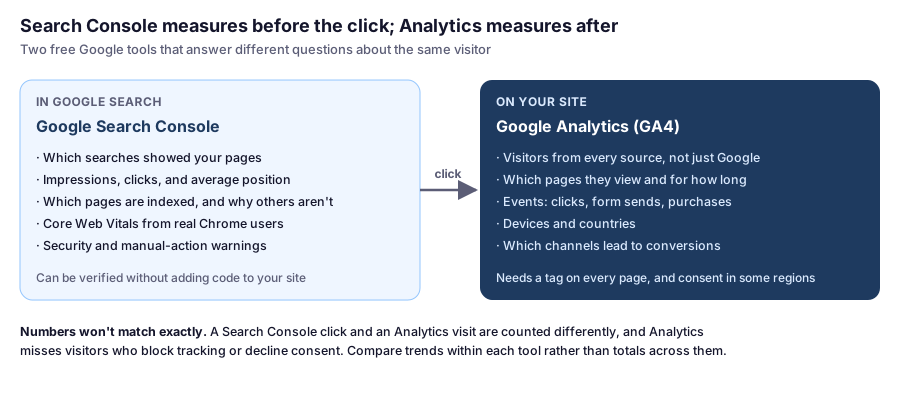
What Each Tool Tells You
Part 1: Google Search Console
Add Your Site
- Go to search.google.com/search-console and choose Add property.
- Pick a property type:
- Domain (recommended): covers every version of your site,
httpandhttps, with and withoutwww, and all subdomains. It must be verified with a DNS TXT record. - URL prefix: covers one exact address, such as
https://yourdomain.com/. It offers more verification methods, including an HTML tag or file, or your Analytics account.
- Domain (recommended): covers every version of your site,
Verify With a DNS Record
For a Domain property, Google gives you a TXT record starting with google-site-verification=.
-
Add it as a TXT record where your DNS is managed. On SiteGround’s DNS, that’s Site Tools › Domain › DNS Zone Editor. Not sure where your DNS lives? Our DNS guide shows how to check.
-
Confirm it’s live before clicking Verify:
dig +short yourdomain.com TXT(On Windows,
nslookup -type=TXT yourdomain.com.) -
Click Verify. Leave the record in place afterward; removing it can make Google drop the verification.
Submit Your Sitemap
In Search Console, open Sitemaps and enter your sitemap’s address. Yoast SEO and Rank Math use /sitemap_index.xml; WordPress’s built-in sitemap is /wp-sitemap.xml. Open the address in your browser first to make sure it loads. Our SEO plugin comparison covers how to find it for other plugins.
Search data isn’t instant. Reports fill in over the following days as Google crawls your site and people search.
Part 2: Google Analytics (GA4)
Create a Property and Data Stream
- Go to analytics.google.com and create an account and a property for your site.
- Add a Web data stream with your site’s address.
- Copy the Measurement ID, which starts with
G-.
Add the Tag to WordPress: Pick One Method
| Method | Good for |
|---|---|
| Site Kit by Google plugin | The simplest option: connects Analytics and Search Console through Google sign-in, and shows summaries in your dashboard |
| Your theme’s or SEO plugin’s header code option | Sites that already manage scripts in one place |
| Google Tag Manager | Sites with several tracking tags or marketing tools |
Use only one. Installing the tag twice, for example through Site Kit and a manual snippet, counts every visit twice, and you won’t notice until the numbers look suspiciously good.
Check That It’s Working
Don’t wait a day to find out it isn’t:
- Open your site in a private window, logged out.
- In Analytics, open Reports › Realtime. Your visit should appear within a minute or so.
- For a closer look, open your browser’s developer tools, go to the Network tab, reload the page, and filter for
collect. You should see a request to Google Analytics for each page view, once. Two requests per page view means the tag is installed twice.
Standard reports can take up to a day or two to process, so Realtime is the place to confirm the setup.
Consent and Privacy
Analytics sets cookies and processes visitors’ data. Depending on where your visitors are, you may need their consent first. In the EU, EEA, and UK in particular, analytics cookies generally require consent before they load.
- Use a consent banner that actually blocks the Analytics tag until visitors agree, rather than one that only displays a notice. Google’s Consent Mode lets the tag adjust its behavior to each visitor’s choice.
- Update your privacy policy to say you use Google Analytics and what it collects.
- Expect lower numbers once consent is required, since visitors who decline aren’t counted. That’s normal.
This isn’t legal advice; if you’re unsure what applies to your site, check with a professional.
What to Check Once Data Comes In
A short monthly routine beats checking dashboards daily:
- Search Console › Performance: queries and pages with many impressions but few clicks. Better titles and descriptions often lift these.
- Search Console › Pages: pages that aren’t indexed, and the reason Google gives.
- Search Console › Core Web Vitals: real-user speed data. Our speed optimization guide explains what each metric means.
- Analytics › Pages and screens: which content people actually read.
- Analytics › Traffic acquisition: where visitors come from, beyond Google search.
FAQ
Should I use a Domain or URL prefix property in Search Console?
A Domain property is usually best: it covers http and https, www and non-www, and all subdomains in one place. It requires verifying with a DNS TXT record. URL prefix properties cover one exact address and allow other verification methods.
How do I know Google Analytics is working on my WordPress site?
Open your site in a private window and check Reports › Realtime in Analytics; your visit should appear within a minute or so. In your browser's developer tools, the Network tab should show one collect request to Google Analytics per page view.
Why are my Analytics numbers doubled?
Usually because the tag is installed twice, for example through Site Kit and a manually added snippet or another plugin. Remove one so each page view sends a single request.
Do I need a cookie banner for Google Analytics?
Often, yes, particularly for visitors in the EU, EEA, and UK, where analytics cookies generally require consent. Use a banner that blocks the tag until visitors agree, and mention Analytics in your privacy policy.
Why don't Search Console clicks match Analytics visits?
They're measured differently: Search Console counts clicks in Google Search, while Analytics counts visits to your site from every source, and misses visitors who block tracking or decline consent. Compare trends within each tool.
Getting Started
Set up Search Console first: it needs one DNS record and starts collecting straight away. Then add Analytics with a single method, confirm it in Realtime, and sort out consent before you share the site widely. Give both a few weeks before drawing conclusions; early numbers are usually too small to mean much.