Adding a Subdomain and Installing a Second WordPress Site
Some links on this page are affiliate links. If you buy through them, we may earn a commission at no extra cost to you. It never decides what we recommend —read how we make money.
A subdomain is an address like shop.yourdomain.com or docs.yourdomain.com. It lives under your existing domain, so there’s nothing new to register, and on SiteGround it can run a completely separate WordPress site.
Before creating one, it’s worth a minute to check you actually need a separate site. Often you don’t, and one site is less work than two.
Do You Need a Separate Site?
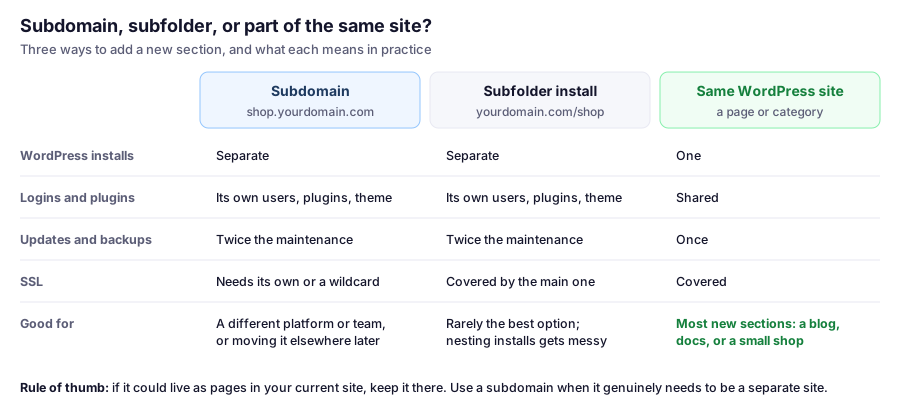
Keep it in your main site if the new section is more content of the same kind: a blog, a help center, a few products. WordPress handles that with pages, categories, or a plugin, and you only maintain one install.
Use a subdomain when the section genuinely needs to be a separate site:
- It needs a different set of plugins or a different theme that would conflict with the main site
- Different people manage it, and they shouldn’t have access to the main site
- It might move to another host or platform later
- It’s a test or development copy and your plan doesn’t include SiteGround’s staging tool
On SEO: Google has said it handles both subdomains and subfolders, so choose based on what’s practical rather than on rankings folklore. Just remember a subdomain is a separate site to build up, with its own sitemap to submit in Search Console.
Step 1: Create the Subdomain
- In Site Tools, go to Domain › Subdomains.
- Enter the label, such as
shopforshop.yourdomain.com. - Create it.
If your domain’s nameservers point to SiteGround, the DNS record is handled for you. If your DNS is elsewhere, such as at Cloudflare or your registrar, add a record for the subdomain there, pointing to your Site IP from Site Tools › Dashboard › IP and Name Servers. Our DNS guide explains how to tell which applies.
Step 2: Install WordPress on It
- Go to WordPress › Install & Manage.
- Choose WordPress, then select the subdomain from the Domain dropdown.
- Fill in the site title and admin details, then install.
Use a different admin username and password from your main site. If one site’s login leaks, the other stays safe. For the full walkthrough and the first settings to change, see how to install WordPress on SiteGround.
Step 3: Secure It
SSL: the subdomain needs its own certificate, or a wildcard certificate that covers all first-level subdomains. SiteGround includes free Let’s Encrypt certificates of both kinds; check Security › SSL Manager once DNS resolves. Our SSL guide covers installing and checking one.
If it’s a test copy, keep it private with a password prompt using Security › Protected URLs, so visitors and search engines can’t find it. See password-protecting a site on SiteGround.
What a Second Site Really Adds
A second WordPress install is a second site to look after:
- Updates: its own WordPress core, plugins, and theme to keep current. SiteGround’s Autoupdate can handle core and plugins for each install.
- Security: its own users and logins to manage. An abandoned test site with outdated plugins is a common way into an otherwise well-kept account.
- Resources: both sites share your hosting plan’s limits. On SiteGround, the CPU seconds limit applies to the whole account, so a busy second site uses the same allowance as the first.
- Plan limits: SiteGround’s StartUp plan includes one website. A subdomain running its own install may count as a second site, so check your plan before building, or choose GrowBig for multiple sites.
When a test subdomain has served its purpose, delete the WordPress install and the subdomain rather than leaving it to go stale.
FAQ
How do I create a subdomain on SiteGround?
In Site Tools, go to Domain › Subdomains, enter the label you want, such as shop, and create it. If your DNS is at SiteGround, the DNS record is created for you.
How do I install WordPress on a subdomain on SiteGround?
Go to Site Tools › WordPress › Install & Manage, choose WordPress, and select the subdomain from the Domain dropdown. Then fill in the site and admin details and install.
Is a subdomain or subfolder better for SEO?
Google has said it handles both. Choose based on practical needs: keep new content in your main site when you can, and use a subdomain when a section genuinely needs to be a separate site.
Does a subdomain need its own SSL certificate?
Yes, unless you use a wildcard certificate, which covers all first-level subdomains. SiteGround includes free Let's Encrypt standard and wildcard certificates.
Can I use a subdomain as a staging site?
You can, especially if your plan doesn't include SiteGround's staging tool. Protect it with a password in Security › Protected URLs so it isn't public, and delete it when you're done.
Next Up
With the hosting side covered, the next guides turn to what visitors see: themes and page builders, and how to make your site look the way you want.